
ArgoCD Tutorial for Beginners: GitOps Continuous Delivery for Kubernetes
Quick answer
Argo CD is a GitOps continuous delivery tool built specifically for Kubernetes. It runs inside the cluster, watches a Git repository that holds your Kubernetes manifests, and automatically pulls and applies any change so the cluster always matches what is defined in Git. Instead of a CI tool like Jenkins pushing changes into the cluster with kubectl, Argo CD pulls them, which makes Git the single source of truth and keeps cluster credentials inside the cluster.
Video chapters (15)
- 0:00 Intro and overview
- 0:45 What is ArgoCD
- 1:29 CD workflow without ArgoCD
- 4:48 CD workflow with ArgoCD
- 9:34 Benefits of using GitOps with ArgoCD
- 9:41 Git as single source of truth
- 13:20 Easy rollback
- 14:08 Cluster disaster recovery
- 15:10 K8s access control with Git and ArgoCD
- 16:52 ArgoCD as Kubernetes extension
- 18:49 How to configure ArgoCD
- 20:08 Multiple clusters with ArgoCD
- 23:24 Replacement for other CI/CD tools?
- 24:45 Demo setup and overview
- 27:42 Hands-on demo
Key takeaways
- Argo CD is a pull-based GitOps CD tool that runs inside your Kubernetes cluster.
- It continuously compares the desired state in Git with the live state in the cluster and syncs them when they drift apart.
- Best practice is a separate Git repository for Kubernetes manifests, apart from the application source code.
- You configure Argo CD with Kubernetes-native YAML: the Application custom resource (apiVersion argoproj.io/v1alpha1).
- syncPolicy.automated with selfHeal and prune makes Argo CD sync Git changes, undo manual kubectl edits and delete removed resources.
- Argo CD replaces the CD part of a pipeline for Kubernetes, not CI: you still need Jenkins, GitLab CI or GitHub Actions to test and build.
In this Argo CD tutorial I explain what Argo CD is, why it was built and how its pull-based GitOps workflow differs from the classic Jenkins-style CD pipeline. Then we install Argo CD in a Kubernetes cluster and set up a fully automated deployment with one Application YAML file. You only need basic Kubernetes knowledge (Deployments, Services, kubectl) to follow along.
What is Argo CD?
Argo CD is a continuous delivery tool for Kubernetes that follows GitOps principles. It runs inside your cluster, watches a Git repository that contains your Kubernetes configuration, and automatically pulls and applies any change, so the cluster always matches what is defined in Git.
To see why that matters, let’s first look at how CD to Kubernetes usually works with tools like Jenkins or GitLab CI.
CD to Kubernetes without Argo CD: the push model
Without Argo CD, the CI tool itself deploys to the cluster: after building the image, Jenkins updates the Deployment YAML and runs kubectl apply (or helm upgrade) against the cluster. This is called push-based deployment, because changes are pushed into the cluster from outside.
Say a developer pushes a bug fix to a microservice running in Kubernetes. Jenkins tests it, builds a new Docker image, pushes it to a registry, updates the image tag in deployment.yaml and applies it to the cluster. Many projects work exactly like this, but it has three challenges:
- Tooling on the CI server. You need to install and configure kubectl, Helm and similar tools on Jenkins and on every build agent.
- Credentials outside the cluster. kubectl is just a client, so Jenkins needs Kubernetes credentials. On a managed cluster like EKS you also need cloud credentials, for example AWS credentials. That is a configuration effort and a security risk, and it multiplies: 50 projects deploying to a cluster each need their own scoped credentials, and 50 clusters means configuring access 50 times.
- No visibility after deployment. Once
kubectl applyruns, Jenkins does not know what happened next. Did the pods start? Is the application healthy or crash-looping? You only find out through extra test steps.
So the CD part of the pipeline, specifically for Kubernetes, can be made much more efficient. Argo CD was purpose-built for exactly that.
How does Argo CD work? The pull-based GitOps workflow
Argo CD reverses the flow: instead of an external tool pushing changes into the cluster, Argo CD runs as an agent inside the cluster and pulls changes from a Git repository. You tell Argo CD “connect to this Git repository and watch it”, and whenever something changes there, Argo CD applies the change in the cluster.
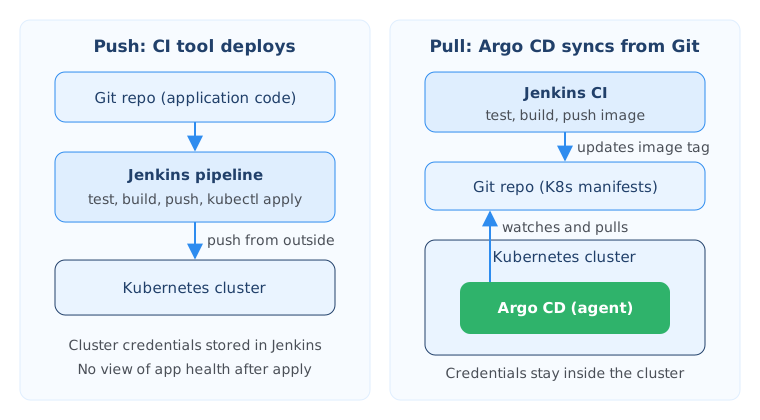
The workflow now looks like this:
- You deploy Argo CD into the cluster and point it at a Git repository.
- A developer commits code. The CI pipeline (Jenkins in our example) tests it, builds the image and pushes it to the registry.
- As its last step, CI updates the image tag in the Kubernetes manifest, for example
deployment.yaml, and commits that change to Git. - Argo CD notices the change in the Git repository and syncs it to the cluster.
Argo CD understands plain Kubernetes YAML, Helm charts and Kustomize files, because all of these eventually render into plain Kubernetes manifests. The repository Argo CD tracks is often called the GitOps repository.
Why use a separate Git repository for Kubernetes manifests?
It is an established best practice to keep application source code and application configuration in separate Git repositories. The configuration is not just a Deployment. It is also the Service, ConfigMap, Secret references, Ingress and everything else the application needs to run, and those files change independently of the code.
If you change a Service file, you don’t want to run the whole CI pipeline (tests, image build) because the code didn’t change. And you don’t want complicated logic in your build pipeline that figures out which kind of file changed. With two repositories, the code repository triggers CI, and the config repository is what Argo CD deploys from.
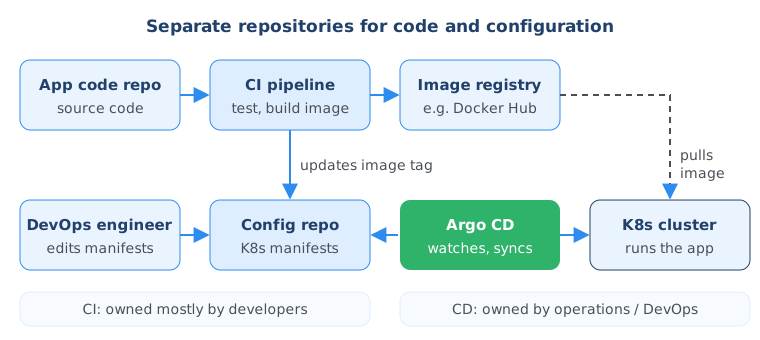
Now the config repository can be updated either by the CI pipeline (a new image version) or by DevOps engineers changing other manifests. Either way, Argo CD applies it automatically. You still have one fully automated CI/CD pipeline, but with a separation of concerns: developers mostly own CI in Jenkins, and operations or DevOps teams own CD in Argo CD.
Benefits of GitOps with Argo CD
The main benefits of using Argo CD are that Git becomes the single source of truth for your cluster, rollbacks and disaster recovery become simple, cluster access is managed through Git, and you get real-time visibility into what is running. The first three are general GitOps benefits you get with any GitOps tool. Argo CD is one way to implement them.
Git as the single source of truth
The whole Kubernetes configuration is defined as code in Git. Instead of everyone running scripts, kubectl apply or helm install from their laptops, everyone uses the same interface to change the cluster: a commit.
But what if someone on the team thinks “a quick kubectl apply is faster than a commit, a review and a merge”? Argo CD watches not only Git but also the cluster. When the desired state in Git and the live state in the cluster no longer match, it syncs whatever is in Git to the cluster and overwrites the manual change. This guarantees that Git stays the only source of truth, and gives you full transparency: what is in the repository is exactly what runs in the cluster.
If your team needs time to adjust, leave automatic overwriting off. Argo CD then just flags the application as out of sync, so you know the manual change still needs to go into Git.
Every change also gets a history and an audit trail, and teams can propose and discuss changes in merge requests.
Easy rollback
If a change breaks something, for example a new application version fails to start, you revert to the previous working commit in Git and Argo CD syncs the cluster back to that state. You don’t manually clean up with kubectl delete or helm uninstall. This is especially valuable when many clusters are updated from the same repository.
Cluster disaster recovery
If a cluster in one region completely crashes, you create a new cluster, point Argo CD at the same Git repository, and it recreates the same state without manual work. That works because the whole cluster is described declaratively in code.
Access control through Git
You don’t want every team member to change a production cluster directly. With GitOps you manage that in Git: anyone on the DevOps team, including junior engineers, can propose changes through merge requests, and only a few senior engineers can approve and merge them. You don’t need to create ClusterRoles and users for every person, because engineers only need access to the Git repository, not to the cluster.
The same applies to non-human users. Jenkins and other external tools no longer need cluster credentials, because Argo CD runs inside the cluster and is the only component that applies changes. Cluster credentials never leave the cluster.
Real-time visibility as a Kubernetes extension
Argo CD is not just deployed in the cluster (you could do that with Jenkins too); it extends the Kubernetes API and uses Kubernetes controllers to compare desired and actual state. That gives it visibility Jenkins doesn’t have: the UI shows in real time whether manifests were applied, pods started and the application is healthy, or whether it is failing.
Argo CD architecture: the Application CRD, projects and multiple clusters
Argo CD sits between two things: Git holds the desired state of your cluster, the Kubernetes cluster holds the actual state, and Argo CD is the agent in the middle that keeps them in sync. You install it like any other cluster tool, such as Prometheus or Istio, and configure it through Kubernetes custom resources.
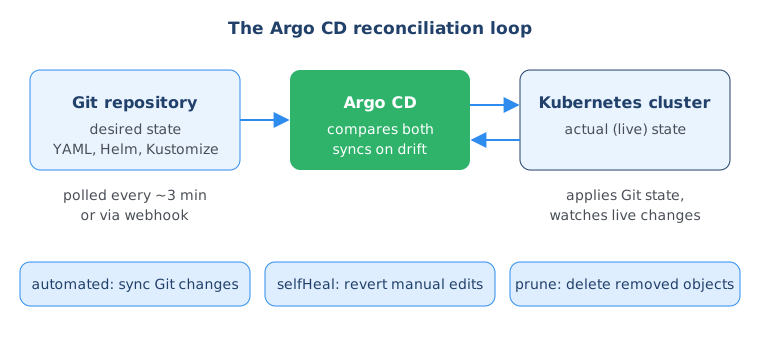
The standard installation runs a few components in the argocd namespace. The most important ones are:
- argocd-server: the API server behind the web UI and the
argocdCLI. - argocd-repo-server: clones Git repositories and renders manifests from plain YAML, Helm or Kustomize.
- argocd-application-controller: the Kubernetes controller that compares live state with desired state and performs the sync.
Argo CD extends Kubernetes with custom resource definitions (CRDs), so you configure it with Kubernetes-native YAML. The main one is the Application: it says which Git repository (and path) should be synced to which cluster and namespace. The destination can be the cluster Argo CD runs in or an external cluster that Argo CD manages. You can create many Applications, for example one per microservice, and group related ones in another CRD called AppProject.
Using Argo CD with multiple clusters and environments
One Argo CD instance can deploy to many clusters. For example, three replicas of a development cluster in three regions can all be managed by a single Argo CD instance running in one of them, so administrators configure and maintain just one Argo CD.
For separate environments such as development, staging and production, you often run an Argo CD instance per environment but keep one configuration repository. Changes shouldn’t hit all environments at once; they should be tested in dev and promoted. There are two common ways to model this in Git:
- One branch per environment (dev, staging, prod). Common, but usually not the best option.
- Kustomize overlays (better). You keep shared base YAML files and an overlay per environment that changes only what differs. Each environment’s pipeline updates its own overlay.
Free download
Not sure what to learn after Argo CD?
GitOps builds on Kubernetes, Git, CI pipelines and infrastructure as code. The roadmap shows the order to learn them in so each tool makes sense.
Argo CD vs Jenkins: does Argo CD replace your CI/CD tool?
No. Argo CD replaces the CD part of the pipeline, and only for Kubernetes. You still need a CI tool like Jenkins, GitLab CI or GitHub Actions to test code changes, build images and push them. For deployment targets other than Kubernetes you also still need a different CD tool.
| Push-based CD (Jenkins, GitLab CI) | Pull-based CD (Argo CD) | |
|---|---|---|
| Who deploys | CI server runs kubectl apply / helm upgrade | Agent inside the cluster syncs from Git |
| Where cluster credentials live | In the CI tool, outside the cluster | Inside the cluster only |
| Visibility after deploy | None without extra test steps | Live sync and health status in the UI |
Manual kubectl changes | Go unnoticed, cluster drifts from Git | Detected, optionally reverted (selfHeal) |
| Rollback | Re-run old pipeline or clean up by hand | Revert the commit in Git |
| Works for | Any target platform | Kubernetes only |
| Builds and tests code | Yes | No, needs a CI tool |
Argo CD is also not the only GitOps tool for Kubernetes. Flux CD is a popular alternative that implements the same GitOps principles.
Argo CD tutorial: install Argo CD and deploy an app with GitOps
In this demo we install Argo CD, configure it with one Application manifest, and then never touch the cluster directly again. We only change files in Git, and Argo CD pulls and applies them.
Demo setup
You need:
- Any Kubernetes cluster. I use an empty Minikube cluster.
- kubectl configured for that cluster.
- A Git repository with Kubernetes manifests. You can fork or clone my config repository at gitlab.com/nanuchi/argocd-app-config.
The repository has a dev folder with a Deployment and a Service. The image nanajanashia/argocd-app is public on Docker Hub and has three version tags, including 1.0 and 1.2, so you can use it too. We start with version 1.0:
# dev/deployment.yaml
apiVersion: apps/v1
kind: Deployment
metadata:
  name: myapp-deployment
spec:
  replicas: 2
  selector:
    matchLabels:
      app: myapp
  template:
    metadata:
      labels:
        app: myapp
    spec:
      containers:
        - name: myapp
          image: nanajanashia/argocd-app:1.0
          ports:
            - containerPort: 8080
# dev/service.yaml
apiVersion: v1
kind: Service
metadata:
name: myapp-service
spec:
selector:
app: myapp
ports:
- port: 8080
protocol: TCP
targetPort: 8080Step 1: Install Argo CD in the cluster
Create the argocd namespace and apply the official install manifest:
kubectl create namespace argocd
kubectl apply -n argocd --server-side --force-conflicts \
  -f https://raw.githubusercontent.com/argoproj/argo-cd/stable/manifests/install.yaml
In the video I use a plain kubectl apply -n argocd -f .... The current Argo CD docs add --server-side --force-conflicts, because some Argo CD CRDs are now too large for client-side apply. If you want to see exactly what gets installed, download the YAML file first and read it.
Wait until all pods are running:
kubectl get pods -n argocd --watchStep 2: Access the Argo CD UI
The installation creates a Service called argocd-server that serves HTTP and HTTPS. The quickest way to reach it locally is a port-forward:
kubectl port-forward svc/argocd-server -n argocd 8080:443Open https://localhost:8080. The browser warns that the certificate is self-signed; proceed anyway for this local demo.
The username is admin. The initial password is generated during installation and stored in the argocd-initial-admin-secret Secret. If you have the argocd CLI installed, print it with:
argocd admin initial-password -n argocdWithout the CLI, read and decode the secret with kubectl (this is what I do in the video):
kubectl -n argocd get secret argocd-initial-admin-secret \
  -o jsonpath="{.data.password}" | base64 -d; echo
After logging in, change the admin password and delete argocd-initial-admin-secret, as the Argo CD docs recommend. The UI is empty for now, because we haven’t told Argo CD what to sync.
Step 3: Write the Argo CD Application YAML
Next we write the Argo CD configuration and store it in the same config repository, in a file called application.yaml at the repository root:
# application.yaml
apiVersion: argoproj.io/v1alpha1
kind: Application
metadata:
  name: myapp-argo-application
  namespace: argocd
spec:
  project: default

  source:
    repoURL: https://gitlab.com/nanuchi/argocd-app-config.git
    targetRevision: HEAD
    path: dev

  destination:
    server: https://kubernetes.default.svc
    namespace: myapp

  syncPolicy:
    syncOptions:
      - CreateNamespace=true
    automated:
      selfHeal: true
      prune: true
Here is what each part does:
- apiVersion and kind:
argoproj.io/v1alpha1is still the current API version for the Application resource, even though the “alpha” name suggests otherwise. Check the declarative setup docs if you are reading this much later. - metadata.namespace: the Application is created in the
argocdnamespace, where Argo CD runs. - project:
defaultis fine if you don’t group applications into AppProjects. - source: the Git repository URL (use your own fork),
targetRevision: HEADto always track the latest commit, andpath: devto sync only that folder. - destination.server:
https://kubernetes.default.svcis the internal address of the Kubernetes API server, reachable because Argo CD runs inside the destination cluster. For an external cluster, use its API server address. - destination.namespace: where the manifests are applied.
myappdoesn’t exist yet, soCreateNamespace=truetells Argo CD to create it. - automated: turns on automatic sync of Git changes. It is off by default, so without it you would sync manually.
- selfHeal: true: undoes manual changes in the cluster, such as a
kubectl edit, by syncing back to the Git state. - prune: true: deletes resources from the cluster when you delete or rename them in Git.
Why are these off by default? My assumption is that it’s a safety mechanism, so that nothing gets deleted or overwritten by accident, and so that teams can switch to this workflow gradually. In Argo CD 3.x you can also write enabled: true under automated to make the setting explicit; leaving automated with its options, like above, enables it too.
With automated sync, Argo CD checks the repository about every three minutes (a 120-second interval plus up to 60 seconds of jitter). If you need deployments the moment a commit lands, configure a webhook from your Git provider to Argo CD.
Step 4: Apply the Application once
Commit and push application.yaml, then apply it to the cluster:
git add application.yaml
git commit -m "Add Argo CD application"
git push
kubectl apply -f application.yaml
Ideally this is the only kubectl apply you ever run in this project.
The Argo CD UI now shows myapp-argo-application, already synced. Click it to see the resource tree: Service, Deployment, ReplicaSet and two pods. Click a pod to see its live manifest, events and logs.
Step 5: Test automatic sync, prune and self-heal
Automatic sync. In the Git repository, change the image in dev/deployment.yaml from nanajanashia/argocd-app:1.0 to nanajanashia/argocd-app:1.2 and commit. Within the polling interval, Argo CD briefly shows the application as OutOfSync, then updates the Deployment. A new ReplicaSet starts two pods with version 1.2:
kubectl get pods -n myapp
kubectl get deployment myapp-deployment -n myapp -o jsonpath="{.spec.template.spec.containers[0].image}"; echo
Prune. Rename the Deployment in Git from myapp-deployment to myapp and commit. Argo CD removes the old Deployment and creates the new one with its own ReplicaSet and pods.
Self-heal. Now change the cluster directly, as someone in a hurry would:
kubectl edit deployment myapp -n myapp
# change replicas: 2 to replicas: 4 and save
Two extra pods appear and are removed almost immediately, because Argo CD reverts the Deployment to the two replicas defined in Git.
Manual sync. When you are experimenting and don’t want to wait, click Refresh in the UI to compare Git and the cluster immediately, then Sync to apply the difference.
In the DevOps Bootcamp you build this kind of GitOps workflow end to end, with a CI pipeline that updates the config repository and Argo CD deploying the result.
Summary
Argo CD turns continuous delivery to Kubernetes from a push model into a pull model: an agent inside the cluster watches a Git repository and keeps the cluster in sync with it. That makes Git the single source of truth, gives you easy rollbacks, disaster recovery and access control through merge requests, and keeps cluster credentials out of your CI tool. You configure it with one Application manifest, and automated with selfHeal and prune gives you a fully automated GitOps pipeline. Argo CD still needs a CI pipeline in front of it, so pair it with the Jenkins pipeline tutorial or GitHub Actions tutorial, and learn Helm charts to package the manifests Argo CD deploys.
Frequently asked questions
What is Argo CD used for?
Argo CD is used to deploy applications and configuration to Kubernetes clusters following GitOps principles. It watches a Git repository with Kubernetes manifests, Helm charts or Kustomize files and automatically applies any change to the cluster. It also shows the live health and sync status of every application in its UI.
Is Argo CD a replacement for Jenkins?
No. Argo CD replaces only the continuous delivery part of a pipeline, and only for Kubernetes. You still need a CI tool such as Jenkins, GitLab CI or GitHub Actions to test code, build the Docker image and push it to a registry. A common setup is that the CI pipeline updates the image tag in the config repository and Argo CD deploys it.
What is the difference between push-based and pull-based deployment?
In push-based deployment an external tool like Jenkins runs kubectl or helm against the cluster, so it needs cluster credentials and has no visibility after the apply. In pull-based deployment an agent inside the cluster, like Argo CD, pulls the desired state from Git and applies it. Credentials stay in the cluster and the agent keeps watching the result.
How often does Argo CD check Git for changes?
By default Argo CD polls the Git repository roughly every three minutes: a 120-second reconciliation timeout plus up to 60 seconds of jitter. You can change this with timeout.reconciliation in the argocd-cm ConfigMap. For instant deployments, configure a webhook from your Git provider to Argo CD.
What do selfHeal and prune do in Argo CD?
selfHeal makes Argo CD revert manual changes in the cluster, for example a kubectl edit, back to the state defined in Git. prune makes Argo CD delete resources from the cluster when they are removed or renamed in Git. Both are off by default and are enabled under spec.syncPolicy.automated in the Application manifest.
What is the default username and password for Argo CD?
The default username is admin. The initial password is generated during installation and stored in the argocd-initial-admin-secret Secret in the argocd namespace. You can print it with argocd admin initial-password -n argocd, and you should change it and delete that secret after the first login.
What is the difference between Argo CD and Flux CD?
Both are GitOps continuous delivery tools for Kubernetes that implement the same pull-based principles. Argo CD is known for its built-in web UI that visualizes applications and their resources. Flux CD is another popular alternative, and which one fits better depends on your team's workflow and preferences.