
Kubernetes Services explained: ClusterIP vs NodePort vs LoadBalancer vs Headless Service
Quick answer
A Kubernetes Service gives a set of pods one stable IP address and DNS name, and load balances requests across them, because pod IPs change every time a pod is recreated. ClusterIP (the default) is reachable only inside the cluster, NodePort opens a fixed port (30000-32767) on every node, and LoadBalancer adds a cloud provider load balancer in front. A headless service (clusterIP: None) has no virtual IP, so DNS returns the individual pod IPs, which stateful apps like databases need.
Video chapters (11)
- 0:00 Intro
- 0:33 What is a Kubernetes Service and when do we need it?
- 2:10 ClusterIP Services
- 6:30 Service communication: selectors, labels and ports
- 9:27 Service Endpoints
- 9:59 Service communication: port vs targetPort
- 11:31 Multi-Port Services
- 12:58 Headless Services
- 18:28 NodePort Services
- 21:22 LoadBalancer Services
- 23:18 Wrap up
Key takeaways
- Pod IP addresses are ephemeral; a Service gives pods a stable IP, DNS name and load balancing.
- ClusterIP is the default type and is only reachable from inside the cluster.
- A Service finds its pods with a selector: a pod must have ALL the selector labels to become an endpoint.
- port is the Service's own port and can be anything; targetPort must match the port the container listens on.
- Multi-port Services must give every port a name.
- A headless Service (clusterIP: None) makes DNS return pod IPs and is used with StatefulSets for direct pod-to-pod communication.
- LoadBalancer builds on NodePort, which builds on ClusterIP; for HTTP apps in production use Ingress or Gateway API instead of NodePort.
In this guide I explain what a Kubernetes Service is, why you need one, and how the different Service types work: ClusterIP, multi-port, headless, NodePort and LoadBalancer. For each one you get a working YAML manifest, and at the end a comparison table and a clear rule for when to use Ingress instead. It’s for anyone who has deployed pods to Kubernetes and now wants to understand how traffic actually reaches them.
What is a Service in Kubernetes and why do you need it?
A Kubernetes Service is a component that gives a group of pods one stable IP address and DNS name and load balances requests across them. You need it because pods are ephemeral: every time a pod dies and is replaced, the new pod gets a new IP address.
In a Kubernetes cluster each pod gets its own internal IP address. But pods come and go all the time. A pod crashes, a node is drained, you roll out a new version, and the replacement pod starts with a different IP. If your application talked to pod IPs directly, you would have to update the address every time a pod is recreated. That doesn’t work.
A Service solves this. You put a Service in front of your pods and it represents a persistent IP address that stays the same, no matter how often the pods behind it change. A Service also does load balancing: if you run three replicas of your microservice or three replicas of MySQL, the Service receives each request and forwards it to one of the replicas. Clients call one stable address instead of keeping track of each pod individually.
That makes Services a good abstraction for loose coupling, inside the cluster and for traffic from outside.
One important thing to understand: a Service is a Kubernetes component just like a pod, but it is not a process. Nothing runs “inside” a Service. It’s an abstraction that represents an IP address and port, and the actual forwarding is implemented on every node by kube-proxy (or by your CNI plugin).
You can see the pod IPs and which node each pod runs on with:
kubectl get pod -o wideYou’ll notice the IPs come from different ranges. Each worker node gets its own range of internal IP addresses (its pod CIDR), and a pod gets an address from the range of the node it starts on.
ClusterIP Service: the default Service type
ClusterIP is the default Service type: it gets an internal virtual IP that is reachable only from inside the cluster. If you create a Service and don’t specify a type, Kubernetes makes it a ClusterIP Service, and it’s the type you’ll use most of the time.
Let’s walk through an example. Imagine a microservice application deployed in the cluster. Each pod has two containers: the microservice itself listening on port 3000, and a sidecar container that collects the logs and ships them to a log store, listening on port 9000. Both ports are open inside the pod, and the pod has its IP address. With two replicas, we get a second, identical pod with a different IP, maybe on another node.
Now the microservice should be reachable from a browser, so we have an Ingress. How does a request get from the Ingress all the way to one of the pods? Through a ClusterIP Service, also called an internal service.
The Service gets its own IP address and is reachable on a port that we define, let’s say 3200. The Ingress rules reference the Service by name, and cluster DNS resolves that name to the Service’s IP. The Ingress hands the request to the Service at that IP and port, and the Service forwards it to one of the pods registered as its endpoints.
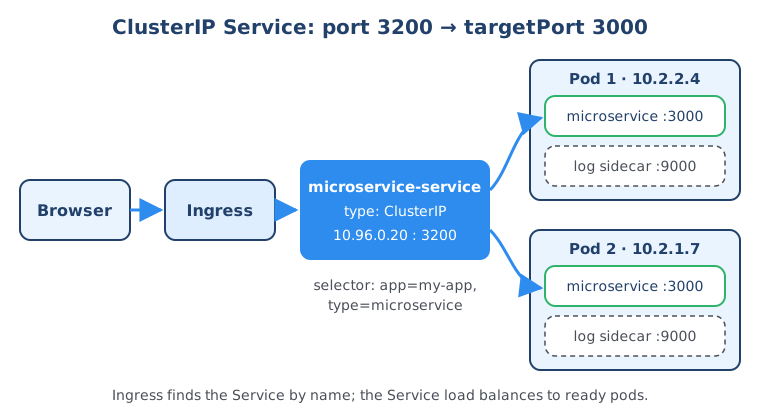
Here is the Deployment and the ClusterIP Service for this example:
apiVersion: apps/v1
kind: Deployment
metadata:
  name: microservice
spec:
  replicas: 2
  selector:
    matchLabels:
      app: my-app
      type: microservice
  template:
    metadata:
      labels:
        app: my-app
        type: microservice
    spec:
      containers:
        - name: microservice
          image: my-registry/microservice:1.0
          ports:
            - containerPort: 3000
        - name: log-collector
          image: my-registry/log-collector:1.0
          ports:
            - containerPort: 9000
---
apiVersion: v1
kind: Service
metadata:
  name: microservice-service
spec:
  # type: ClusterIP is the default, so it can be left out
  selector:
    app: my-app
    type: microservice
  ports:
    - protocol: TCP
      port: 3200
      targetPort: 3000
Apply it and list your Services:
kubectl apply -f microservice.yaml
kubectl get svc microservice-service
Other pods in the same namespace can now reach the app at http://microservice-service:3200, and pods in other namespaces at microservice-service.<namespace>.svc.cluster.local:3200.
The same pattern works for pod-to-pod communication. Say our microservice talks to a MongoDB database with two replicas. MongoDB gets its own ClusterIP Service, and the microservice simply connects to that Service’s name and port. The Service picks one MongoDB replica and forwards the request to the port MongoDB listens on.
How does a Service know which pods to forward to? Selectors and labels
A Service finds its pods through its selector: a set of key-value labels, and every pod that carries all of those labels becomes a member of the Service. This answers the first of two questions every Service has to solve: which pods do I forward to?
In the pod template (or a standalone pod) you assign labels in the metadata section. Labels are arbitrary: you choose the keys and values yourself, like app: my-app and type: microservice. In the Service you then define a selector with the labels a pod must have.
If a Deployment creates three replicas with the labels app: my-app and type: microservice, and the Service selector lists both labels, the Service matches all three replicas and registers them as its endpoints. Note that a pod must match all selector labels, not just one. A pod with only app: my-app would not be selected.
# In the pod template
metadata:
  labels:
    app: my-app
    type: microservice

# In the Service
spec:
  selector:
    app: my-app
    type: microservice
When the Service gets a request, it picks one of those pod replicas (it’s a load balancer) and sends the request there. Only pods that are ready, meaning their readiness probe passes, receive traffic.
Service endpoints
When you create a Service with a selector, Kubernetes automatically tracks which pods are its members. This list is dynamic: whenever a new replica starts or a pod dies, the endpoints are updated.
In the video I show the Endpoints object, which has the same name as the Service. Today Kubernetes tracks endpoints with EndpointSlice objects instead; the old Endpoints API is deprecated since Kubernetes 1.33 (it still exists for compatibility). To check which pod IPs a Service currently routes to, use:
kubectl get endpointslices -l kubernetes.io/service-name=microservice-service
kubectl describe svc microservice-service
If this list is empty, your selector doesn’t match your pod labels, or the pods aren’t ready. That’s the first thing I check when a Service “doesn’t work”.
Port vs targetPort in a Kubernetes Service
port is the port the Service itself listens on, and targetPort is the port on the pod where the container listens and where the Service forwards the traffic. That’s the second question a Service has to answer: if a pod has several ports open, which one gets the request?
In our example the pod has two ports open, 3000 for the microservice and 9000 for the log collector. With targetPort: 3000 the Service sends requests to the microservice container.
The key difference: the Service port is arbitrary, you can pick any value. The targetPort is not arbitrary, it must match the port the application container actually listens on.
| Field | Belongs to | Who uses it | Can you choose it freely? |
|---|---|---|---|
port | The Service | Clients inside the cluster connect to service-name:port | Yes, any valid port |
targetPort | The pod / container | The Service forwards traffic to podIP:targetPort | No, must match the containerPort the app listens on (defaults to port if omitted) |
nodePort | Every worker node | External clients connect to nodeIP:nodePort (NodePort and LoadBalancer only) | Yes, within 30000-32767, or let Kubernetes pick one |
containerPort | The container spec | Documents the port the app listens on; can be given a name | Defined by your application |
A useful trick: if you name the port in the container spec, targetPort can reference the name instead of the number. Then you can change the container port later without touching the Service.
# Container
ports:
  - name: http
    containerPort: 3000

# Service
ports:
  - port: 3200
    targetPort: http
Multi-port Services: exposing several ports with named ports
A multi-port Service exposes more than one port on the same Service, and when you define more than one port, each port must have a name. With a single port, name is optional.
Back to the MongoDB example. Inside each MongoDB pod there is a second container, a MongoDB exporter that exposes metrics for Prometheus on port 9216. Prometheus in the cluster wants to scrape those metrics, while the microservice wants to talk to the database on 27017. So the Service has to handle two kinds of requests and needs two of its own ports open:
apiVersion: v1
kind: Service
metadata:
  name: mongodb-service
spec:
  selector:
    app: mongodb
  ports:
    - name: mongodb
      protocol: TCP
      port: 27017
      targetPort: 27017
    - name: mongodb-exporter
      protocol: TCP
      port: 9216
      targetPort: 9216
The database clients connect to mongodb-service:27017 and Prometheus scrapes mongodb-service:9216. Port names must be lowercase alphanumeric characters or -, and unique within the Service.
Free download
Not sure what to learn after Kubernetes Services?
Services are one piece of Kubernetes networking, which itself is one piece of the DevOps skill set next to CI/CD, infrastructure as code, cloud and monitoring. The roadmap shows you what to learn in which order.
What is a headless Service in Kubernetes?
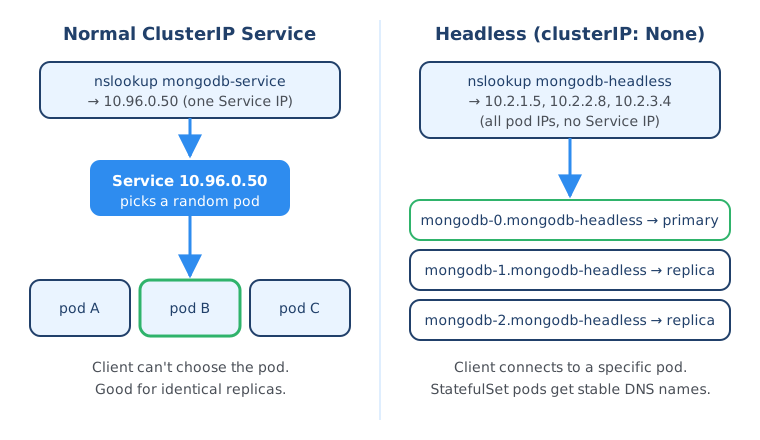
A headless Service is a Service with clusterIP: None: it gets no virtual IP and does no load balancing, so a DNS lookup of its name returns the IP addresses of the individual pods instead. You use it when a client needs to talk to one specific pod, or when pods need to talk to each other directly.
So far, every request to a Service went to a random replica. But if a client must reach one particular pod, or the pods must talk to each other directly, a load-balancing Service doesn’t help.
Why stateful applications need headless Services
The typical use case is stateful applications like MySQL, MongoDB or Elasticsearch. Their replicas aren’t identical; each one has its own state and role. With MySQL, for example, you have a primary instance and replica instances. Only the primary is allowed to write to the database, and the replicas connect to the primary to synchronize their data after it changes. When a new replica starts, it must connect directly to an existing replica to clone the data and get up to date. All of that requires direct communication with individual pods.
How does a client find each pod’s IP? Asking the Kubernetes API server for the pod list would tie your application to the Kubernetes API and be inefficient.
Kubernetes offers a better way: DNS. Normally, a DNS lookup for a Service name returns a single IP, the Service’s ClusterIP. But if you set clusterIP: None, Kubernetes assigns no ClusterIP, and the DNS lookup returns the IP addresses of the pods behind the Service. Now the client does a simple DNS lookup and connects to the pod it wants, or to all of them.
Headless Service YAML with a StatefulSet
The only difference in the YAML is clusterIP: None. In practice you pair it with a StatefulSet, which references the headless Service in serviceName:
apiVersion: v1
kind: Service
metadata:
  name: mongodb-headless
spec:
  clusterIP: None
  selector:
    app: mongodb
  ports:
    - name: mongodb
      port: 27017
      targetPort: 27017
---
apiVersion: apps/v1
kind: StatefulSet
metadata:
  name: mongodb
spec:
  serviceName: mongodb-headless
  replicas: 3
  selector:
    matchLabels:
      app: mongodb
  template:
    metadata:
      labels:
        app: mongodb
    spec:
      containers:
        - name: mongodb
          image: mongo:7.0
          ports:
            - containerPort: 27017
Because of serviceName, every StatefulSet pod gets its own stable DNS name in the form <pod-name>.<service-name>.<namespace>.svc.cluster.local, for example mongodb-0.mongodb-headless.default.svc.cluster.local. That’s how replicas find the primary or each other, even after a pod is recreated with a new IP.
When you list your Services, you’ll see the headless Service has None in the CLUSTER-IP column:
kubectl get svcYou can verify the DNS behavior from a temporary pod:
kubectl run dns-test --rm -it --image=busybox:1.36 --restart=Never -- nslookup mongodb-headlessFor a headless Service this returns one address per ready pod; for a normal Service it returns a single ClusterIP.
Note that for stateful applications like MongoDB you usually run both: a normal ClusterIP Service for regular client traffic that can go to any replica (and for other containers in the pod, like the exporter), and a headless Service for the cases where a client must reach a specific pod, like writing to the primary or replicas syncing data. The two live side by side.
Running databases in Kubernetes is complex, which is why many teams use an operator or a database designed for it. In the DevOps Bootcamp you deploy stateful applications with StatefulSets and Helm on a real cluster end to end.
NodePort Service: exposing a port on every node
A NodePort Service makes your application reachable from outside the cluster on a static port, between 30000 and 32767, on every worker node. External clients connect to <any-node-IP>:<nodePort>.
When you define a Service you can set type to one of three main values: ClusterIP (the default), NodePort or LoadBalancer. A ClusterIP Service is only reachable inside the cluster; no external traffic can address it directly. With NodePort, instead of going through an Ingress, the browser request comes directly to a worker node on the port defined in the nodePort attribute.
apiVersion: v1
kind: Service
metadata:
  name: microservice-nodeport
spec:
  type: NodePort
  selector:
    app: my-app
    type: microservice
  ports:
    - protocol: TCP
      port: 3200
      targetPort: 3000
      nodePort: 30008
The nodePort value must be in the range 30000-32767 by default; anything outside is rejected. If you leave nodePort out, Kubernetes picks a free port from the range for you.
A NodePort Service still has a port, because Kubernetes automatically creates the ClusterIP part as well. When you run kubectl get svc, a NodePort Service shows a CLUSTER-IP and a PORT(S) value like 3200:30008/TCP, meaning Service port 3200 and node port 30008.
The Service also spans all worker nodes. If you have three replicas on three different nodes, a request can arrive on any node’s port and is forwarded to one of the replicas, even one on another node.
Why not use NodePort for everything? You open ports on every worker node, so external clients talk to your nodes directly, and with many NodePort Services you have a lot of open ports to manage. It’s neither efficient nor very secure. NodePort is fine for quickly testing something or for local clusters like minikube or kind, but not for production traffic.
LoadBalancer Service: using the cloud provider’s load balancer
A LoadBalancer Service exposes your application through the cloud provider’s native load balancer, which gets an external IP or host name and forwards traffic to the node ports of your Service. It’s the better alternative to opening NodePorts to the world.
Every major cloud platform, like AWS, Google Cloud, Azure, Linode (Akamai) and OpenStack, has its own load balancer implementation, and Kubernetes provisions one whenever you create a Service of type LoadBalancer. Kubernetes automatically creates the NodePort and ClusterIP parts too, and the cloud load balancer routes traffic to them.
apiVersion: v1
kind: Service
metadata:
  name: microservice-loadbalancer
spec:
  type: LoadBalancer
  selector:
    app: my-app
    type: microservice
  ports:
    - protocol: TCP
      port: 3200
      targetPort: 3000
      nodePort: 30010
The port belongs to the ClusterIP part, and nodePort is the port opened on the worker nodes. The difference to NodePort is that clients don’t connect to the nodes; the entry point is the load balancer, which forwards to the node port, which forwards to the pods.
kubectl get svc microservice-loadbalancerThe EXTERNAL-IP column shows <pending> until the cloud provider has created the load balancer, then its address. On a local cluster without a cloud provider it stays pending, unless you install something like MetalLB.
So the three types build on each other: LoadBalancer is an extension of NodePort, which is an extension of ClusterIP.
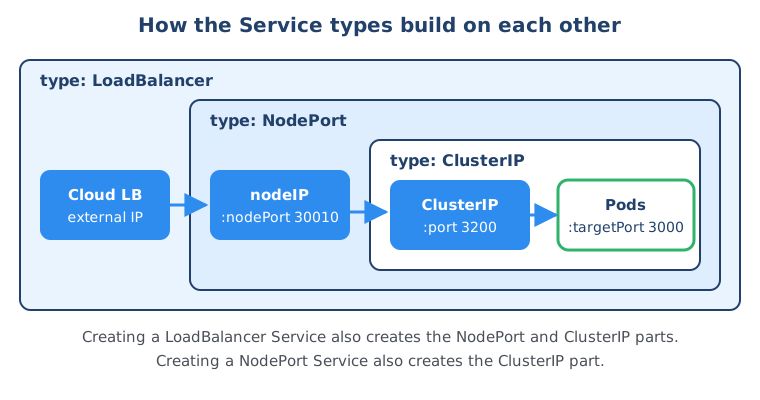
ClusterIP vs NodePort vs LoadBalancer vs Headless: comparison
Here are all the Service types side by side. I’ve added ExternalName for completeness; it isn’t covered in the video, but you’ll see it in real clusters.
| Service type | How to define it | Reachable from | Gets a ClusterIP? | Load balancing | Typical use case |
|---|---|---|---|---|---|
| ClusterIP | default, or type: ClusterIP | Inside the cluster only | Yes | Yes, across ready pods | Internal communication: app to database, Ingress to app |
| Headless | clusterIP: None | Inside the cluster, via DNS returning pod IPs | No | No, client picks the pod | StatefulSets, databases, direct pod-to-pod communication |
| NodePort | type: NodePort | Outside, at nodeIP:nodePort (30000-32767) | Yes | Yes | Quick tests, local clusters, behind your own external load balancer |
| LoadBalancer | type: LoadBalancer | Outside, at the cloud load balancer’s address | Yes, plus a NodePort | Yes, cloud LB plus Service | Exposing one service directly in a cloud environment, including non-HTTP traffic |
| ExternalName | type: ExternalName | Inside the cluster, as a DNS alias (CNAME) | No | No | Giving an external host name like a managed database an in-cluster name |
When to use Ingress instead of NodePort or LoadBalancer
For web applications in production, put an Ingress (or the newer Gateway API) in front of ClusterIP Services instead of exposing each Service with NodePort or LoadBalancer. One entry point then routes HTTP traffic to many Services by host name and path.
In a real setup you would rarely use NodePort for external traffic. For an application that’s accessed through a browser you have two options:
- Ingress + ClusterIP Services: your Services stay internal, and the Ingress controller (which itself is usually exposed with a single LoadBalancer Service) routes requests to them. Many apps, one load balancer.
- A LoadBalancer Service per application: simple and protocol-agnostic, but every Service gets its own cloud load balancer, which adds cost and more things to manage.
Here’s a minimal Ingress that routes to our ClusterIP Service on port 3200:
apiVersion: networking.k8s.io/v1
kind: Ingress
metadata:
  name: microservice-ingress
spec:
  ingressClassName: nginx
  rules:
    - host: myapp.example.com
      http:
        paths:
          - path: /
            pathType: Prefix
            backend:
              service:
                name: microservice-service
                port:
                  number: 3200
The ingressClassName must match an Ingress controller installed in your cluster. Ingress is still fully supported, but for new setups also look at the Gateway API (gateway.networking.k8s.io/v1), the newer and more expressive successor API for traffic routing. Either way the backend is the same: a ClusterIP Service.
Summary
A Kubernetes Service gives ephemeral pods a stable IP, a DNS name and load balancing. It selects pods by labels, forwards from its own port to the container’s targetPort, and needs named ports when it exposes more than one. ClusterIP is the default for internal traffic, a headless Service (clusterIP: None) lets clients and StatefulSet replicas reach specific pods through DNS, NodePort opens a port on every node, and LoadBalancer puts a cloud load balancer in front of that. For HTTP traffic in production, use Ingress or Gateway API in front of ClusterIP Services. Next, learn how to package these manifests with Helm charts and deploy them automatically with Argo CD or a GitHub Actions pipeline.
Frequently asked questions
What is the difference between ClusterIP, NodePort and LoadBalancer?
ClusterIP gives the Service an internal virtual IP that is only reachable from inside the cluster. NodePort additionally opens the same static port (30000-32767) on every worker node so external clients can reach it at nodeIP:nodePort. LoadBalancer additionally provisions a cloud provider load balancer that forwards traffic to those node ports, so each type is an extension of the previous one.
What is the difference between port and targetPort in a Kubernetes Service?
port is the port the Service itself listens on, and clients inside the cluster connect to serviceName:port. targetPort is the port on the pod where the container actually listens, and the Service forwards traffic there. port can be any value you choose, while targetPort must match the containerPort of your application. If you leave targetPort out, it defaults to the same value as port.
What is a headless service in Kubernetes?
A headless service is a Service with clusterIP set to None, so Kubernetes assigns it no virtual IP and does no load balancing. Instead, a DNS lookup of the service name returns the IP addresses of the individual pods behind it. It is used for stateful applications such as databases, where clients or replicas need to talk to one specific pod, and it is required as the governing service of a StatefulSet.
What is the default Service type in Kubernetes?
The default Service type is ClusterIP. If you create a Service without a type field, Kubernetes makes it a ClusterIP Service that is reachable only from inside the cluster through its virtual IP and DNS name.
What is the NodePort range in Kubernetes?
By default, NodePort values must be between 30000 and 32767. If you set nodePort yourself it must be inside that range, and if you leave it out Kubernetes picks a free port from the range automatically. Cluster administrators can change the range with the kube-apiserver flag --service-node-port-range.
Should I use LoadBalancer or Ingress?
A LoadBalancer Service gives one Service its own external cloud load balancer, which is simple and works for any TCP or UDP protocol. Ingress, or the newer Gateway API, puts one entry point in front of many HTTP services and routes by host name and path, so you don't pay for and manage a separate load balancer per service. For several web applications in production, Ingress or Gateway API is usually the better choice.
How does a Kubernetes Service know which pods to send traffic to?
A Service uses its selector, a set of key-value labels. Every pod that has all of those labels and is ready becomes an endpoint of the Service. Kubernetes tracks these endpoints automatically in EndpointSlice objects and updates them whenever pods are created, deleted or become unready.