
Networking concepts explained: IP addresses, DNS, ports, subnets, NAT, cloud, Docker and Kubernetes networking
Quick answer
Computer networking rests on five ideas: every device gets an IP address so others can reach it (and DNS turns names like google.com into those addresses), ports let one server run many applications, subnets and routing divide a network into sections and connect them, firewalls decide which traffic is allowed, and NAT lets many private machines share one public IP to reach the internet. Cloud VPCs, Docker networks and Kubernetes Services are the same five ideas offered as managed tools.
Video chapters (9)
Key takeaways
- An IP address identifies a device on a network; DNS translates human-friendly names into IP addresses.
- Ports (0 to 65,535) let many applications share one IP address, for example 443 for HTTPS and 3306 for MySQL.
- Subnets split a network into sections for security, routing connects those sections, and firewalls decide which traffic is allowed between them.
- Private IP addresses (10.x, 172.16-31.x, 192.168.x) can't be reached from the internet; NAT lets them share one public IP for outgoing traffic.
- In the cloud, a VPC with public and private subnets, route tables, an internet gateway and a NAT gateway rebuilds the same architecture as a managed service.
- Docker containers talk over bridge networks and are exposed with port mapping (-p host:container); Kubernetes gives every pod an IP, Services a stable name, and Ingress routes outside traffic in.
In this guide I explain the essential networking concepts every software engineer needs, with no prior knowledge required. We follow one imaginary travel booking website, TravelBuddy, as it grows from a single server to a cloud system on Docker and Kubernetes, and learn each concept exactly when it becomes necessary.
What is an IP address and what is DNS?
An IP address is a number that identifies a device on a network so other devices can send data to it. DNS (Domain Name System) translates easy-to-remember names like travelbuddy.com into those IP addresses, so you never have to type the numbers yourself.
TravelBuddy starts with one server running the whole application. The first question: how do customers find that server on the internet? Every device on a network needs an identifier, the IP address (Internet Protocol address). Think of it like a house address for mail delivery. Our server gets a public IP address, for example 203.0.113.10, which any device on the internet can send requests to.
The addresses in this guide, like
203.0.113.10, come from ranges reserved for documentation, so they’re safe to use as examples and don’t belong to a real server.
An IPv4 address is four numbers from 0 to 255 separated by dots. The newer IPv6 format (like 2001:db8::1) has far more addresses, but the concepts are the same.
How DNS works
Nobody memorizes IP addresses, just like you don’t memorize phone numbers anymore. DNS works like the contacts app on your phone: you tap “Mom” and the phone finds the number in the background. When someone types travelbuddy.com, the browser asks DNS for the IP, gets 203.0.113.10, and connects to it. Try it yourself (Linux and macOS; nslookup also works on Windows):
# Look up the IP address behind a domain name
nslookup example.com

# Same lookup with dig, printing only the answer
dig +short example.com

# Show the IP addresses of your own machine (Linux)
ip addr show
# On macOS use:
ifconfig
What is a port in networking?
A port is a numbered channel on a server, from 0 to 65,535, and each application on the server listens on its own port. The IP address gets traffic to the right machine; the port number gets it to the right application on that machine.
TravelBuddy’s server now runs three things, the website, a MySQL database and a payment service, all on the same IP address. How does the server know which application a request is for? Think of an apartment building: one street address (the IP), many apartment numbers (the ports).
| Port | Application | Why this number |
|---|---|---|
| 80 | Website over HTTP | Standard port for web traffic |
| 443 | Website over HTTPS | Standard port for secure (encrypted) web traffic |
| 3306 | MySQL database | Default MySQL port |
| 9090 | Payment service | A custom port we chose ourselves |
A browser connects to port 443 for https:// (80 for http://) automatically. Ports 0 to 1023 are “well-known” ports for standard services like HTTP, HTTPS and SSH (22); for your own apps pick a higher free number. Each port is used with a protocol, usually TCP (reliable delivery: web, databases, SSH) or UDP (faster, no delivery guarantee: DNS lookups, video calls). To see what listens where on a Linux server:
# List listening TCP sockets with the process that owns them
sudo ss -tlnp
What happens when you type a URL into your browser?
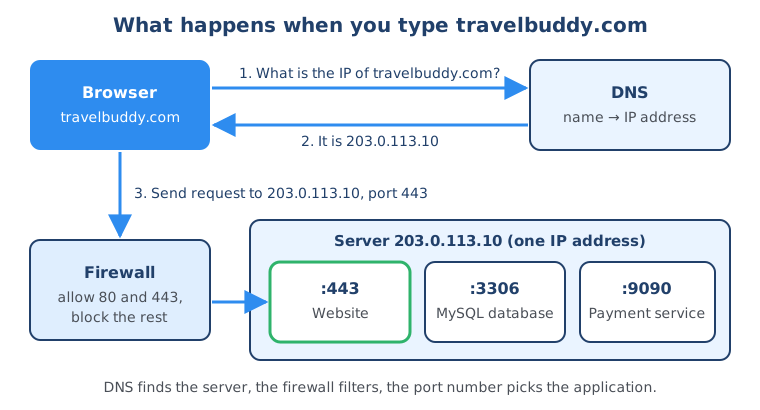
Putting it together:
- The browser asks DNS for the IP address of
travelbuddy.comand gets203.0.113.10. - The browser sends a request to
203.0.113.10on port 443, because the URL starts withhttps://. - A firewall in front of the server checks the request and lets it through, because port 443 is allowed (more on firewalls below).
- The server sees the destination port 443 and passes the request to the web application listening there.
Subnets, routing and firewalls: how to secure a network
To secure a network you divide it into separate sections called subnets (network segmentation), connect those sections with routing, and use firewalls to allow only the traffic you actually need between them.
TravelBuddy now handles credit cards and personal data. With everything on one server, a hacker who breaks in gets access to everything. So we separate things.
What is a subnet?
A subnet is a section of a network with its own IP address range, like a hospital with separate floors and wings for different patients:
- Subnet A,
10.0.1.0/24: public-facing front-end servers - Subnet B,
10.0.2.0/24: application servers - Subnet C,
10.0.3.0/24: database servers
The /24 is CIDR notation: the first 24 of the 32 bits (here 10.0.1) are fixed, so 10.0.1.0/24 covers 10.0.1.0 to 10.0.1.255, 256 addresses. A smaller number means a bigger range: 10.0.0.0/16 covers 65,536 addresses.
What is routing?
Routing is how traffic finds its way between networks or subnets. When the website in subnet A needs the database in subnet C, a router picks the path, like a GPS for network data. Every machine has a routing table:
# Show the routing table (Linux)
ip route
# On macOS use:
netstat -rn

# Show every router (hop) on the way to a destination
traceroute example.com
What is a firewall?
A firewall is like a security guard that checks every piece of traffic and allows or blocks it based on rules you set. Routing alone leaves all the doors between our rooms open; just because traffic can be routed doesn’t mean it should be allowed. You use two kinds:
- A host firewall protects one server. On the database server: accept port 3306 only from the front-end subnet, block everything else.
- A network firewall filters traffic for a whole subnet. Between the internet and the front-end subnet: allow ports 80 and 443, block the rest.
The database rule with ufw, Ubuntu’s simple firewall tool:
# Block all incoming traffic by default
sudo ufw default deny incoming
sudo ufw default allow outgoing

# If you manage the server over SSH, allow it first so you don't lock yourself out
sudo ufw allow 22/tcp

# Allow MySQL (port 3306) only from the front-end subnet
sudo ufw allow from 10.0.1.0/24 to any port 3306 proto tcp

# Turn the firewall on and check the rules
sudo ufw enable
sudo ufw status numbered
An attacker now has to get through several checkpoints before doing damage. Security is always layered.
What is NAT (network address translation)?
NAT lets many devices with private IP addresses share one public IP address when they access the internet. The NAT device swaps the private sender address for its public one on the way out and sends each response back to the right machine on the way in.
TravelBuddy now has 50 backend servers in a private subnet with private IP addresses like 10.0.2.5 and 10.0.2.6, from the reserved ranges 10.0.0.0/8, 172.16.0.0/12 and 192.168.0.0/16. They work inside your network but the internet can’t route to them, like an internal phone extension you can’t dial from home. But these servers need the internet for updates or external payment APIs, and 50 public IPs would cost money and expose them again. NAT solves this:
- Backend server
10.0.2.5wants to download a database update, so it sends the request to the NAT device. - The NAT device replaces the private source address
10.0.2.5with its own public IP address and sends the request out to the internet. - The response comes back to the NAT device’s public IP. The NAT device remembers “this one belongs to
10.0.2.5” and forwards it there.
Think of an office receptionist who places outside calls on the company’s main line and routes the answers back to the right desk. All 50 servers reach the internet through one public IP, but nobody outside can open a connection to them. Your home router does the same for every device on your Wi-Fi.
Free download
Networking is one piece. What else do you need to learn?
IP addresses, DNS, ports and firewalls show up in every IT job, next to Linux, the command line, Git and how software projects are built and deployed. The roadmap shows you what to learn in which order.
How does cloud networking work? VPC, subnets and gateways
Cloud networking uses the same concepts you just learned, offered as managed services: a VPC (virtual private cloud) is your isolated network, divided into public and private subnets, connected by route tables, with an internet gateway for public traffic and a NAT gateway for outgoing traffic from private subnets.
Buying and maintaining physical servers is slow, so TravelBuddy moves to the cloud: we rent computing resources and change capacity in minutes instead of weeks. The networking concepts stay the same; the cloud offers them as services:
- VPC (virtual private cloud): your own isolated part of the provider’s network, with a range like
10.0.0.0/16. Like renting an office floor in a shared building. - Subnets: public subnets for internet-facing resources, private subnets for everything you want to protect.
- Internet gateway: connects public subnets to the internet, the building’s main entrance.
- Route tables: signposts for traffic; a subnet’s route table makes it public or private.
- NAT gateway: managed NAT, placed in a public subnet for the private subnets’ outbound traffic.
- Security groups and network ACLs: cloud firewalls. In AWS a security group protects individual resources (host firewall), a network ACL a whole subnet (network firewall).
TravelBuddy’s route tables:
| Subnet | Destination | Target | Meaning |
|---|---|---|---|
Public 10.0.1.0/24 | 10.0.0.0/16 | local | Traffic to anything in the VPC stays inside |
Public 10.0.1.0/24 | 0.0.0.0/0 | internet gateway | Everything else goes to the internet directly |
Private 10.0.2.0/24 | 10.0.0.0/16 | local | Traffic to anything in the VPC stays inside |
Private 10.0.2.0/24 | 0.0.0.0/0 | NAT gateway | Everything else goes out through NAT, outbound only |
0.0.0.0/0 means “any address”: the default route for everything not matched more specifically.
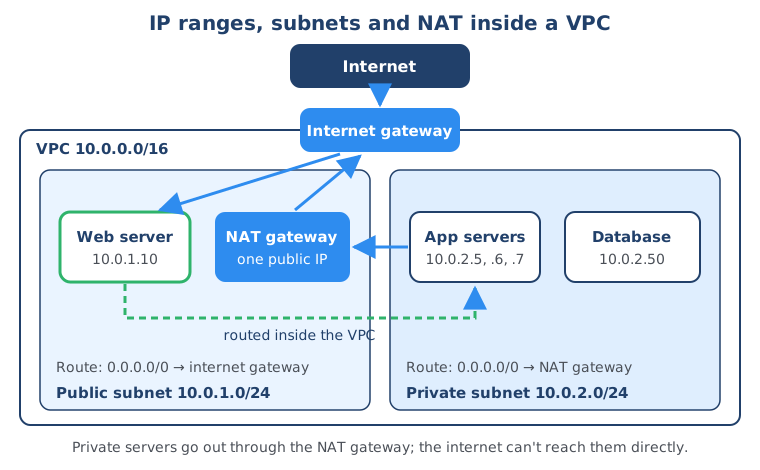
It’s the same secure architecture as before, now with cloud flexibility.
How does Docker container networking work?
Docker containers on the same server talk to each other over a bridge network, a private virtual network on that host. To make an application inside a container reachable from outside, you map a port on the host to the port inside the container. Containers on different servers can be connected with an overlay network.
TravelBuddy moves to microservices and keeps hitting “it works on my laptop but not in production”. A container packages the code, runtime, libraries and settings into one portable unit, like a food truck that has everything inside, compared to a restaurant that’s hard to move. With Docker, the same container runs on laptops, test servers and production.
Bridge networks: containers on one server
A bridge network is a private network that exists only on one server. Containers on the same user-defined bridge network reach each other by container name through Docker’s built-in DNS.
# Create a user-defined bridge network
docker network create travelbuddy-net

# Run two containers on it
docker run -d --name database --network travelbuddy-net \
  -e MYSQL_ROOT_PASSWORD=change-me mysql:8.4
docker run -d --name payment --network travelbuddy-net travelbuddy/payment:1.0

# Inside the payment container, the database is now reachable as "database:3306"
Name-based lookup only works on networks you create yourself. Containers on Docker’s default
bridgenetwork can reach each other by IP address but not by name, so always create your own network for multi-container apps.
Port mapping: reaching a container from outside
The payment service listens on port 9090 inside its container, but outside requests arrive at the host’s IP. You map a host port to the container port with -p host-port:container-port:
# Replace the earlier container with one that publishes port 9090 on the host
docker rm -f payment
docker run -d --name payment --network travelbuddy-net -p 9090:9090 travelbuddy/payment:1.0

# Check the mapping
docker port payment
This is similar to NAT: addresses and ports are translated between the host network and the container network. The numbers can differ: -p 8080:9090 forwards host port 8080 to container port 9090.
Overlay networks: containers across many servers
When containers run on several servers, a Docker overlay network spans all hosts so they behave as if on one network. It requires Docker Swarm mode:
# On the first server: turn on Swarm mode, then create an overlay network
docker swarm init
docker network create -d overlay --attachable travelbuddy-overlay
Kubernetes doesn’t use Docker overlay networks; a CNI network plugin (such as Calico, Cilium or Flannel) connects pods across servers.
How does Kubernetes networking work? Pods, Services and Ingress
In Kubernetes, every pod gets its own IP address, a Service gives a group of pods one stable IP address and DNS name that never changes, and an Ingress routes traffic from the internet to the right Service based on the host name and URL path.
With hundreds of containers across dozens of servers, manual management is impossible: where does a new container run, who notices a crash, how do moving containers find each other? Kubernetes automates this, like an automated building manager.
Pods get their own IP address
The basic unit is the pod, one or more closely related containers (usually one) sharing one IP address, like an apartment unit. But pods are ephemeral: Kubernetes replaces them on crashes and updates, and every new pod gets a new IP. A website connecting to a database pod by IP would break.
Services give pods a stable address
A Service has a stable IP and DNS name. The website connects to database-service, which forwards to a healthy database pod; when pods are replaced, the Service updates and the website notices nothing. It’s like a department phone number: the person answering changes, the number doesn’t.
apiVersion: v1
kind: Service
metadata:
  name: database-service
spec:
  selector:
    app: database        # forward to all pods with this label
  ports:
    - port: 3306         # port the Service listens on
      targetPort: 3306   # port the MySQL container listens on
Other pods in the same namespace now reach the database at database-service:3306. The full DNS name is database-service.<namespace>.svc.cluster.local. For all the Service types (ClusterIP, NodePort, LoadBalancer, headless) see my guide on Kubernetes Services.
Ingress routes outside traffic into the cluster
To let external users in, an Ingress acts like a reception desk: one entry point that routes requests to the right Service by rules:
apiVersion: networking.k8s.io/v1
kind: Ingress
metadata:
  name: travelbuddy-ingress
spec:
  ingressClassName: nginx   # the Ingress controller installed in your cluster
  rules:
    - host: travelbuddy.com
      http:
        paths:
          - path: /api/booking
            pathType: Prefix
            backend:
              service:
                name: booking-service
                port:
                  number: 8080
          - path: /api/payment
            pathType: Prefix
            backend:
              service:
                name: payment-service
                port:
                  number: 9090
          - path: /
            pathType: Prefix
            backend:
              service:
                name: website-service
                port:
                  number: 80
An Ingress needs an Ingress controller running in the cluster to apply these rules. The newer Gateway API follows the same idea.
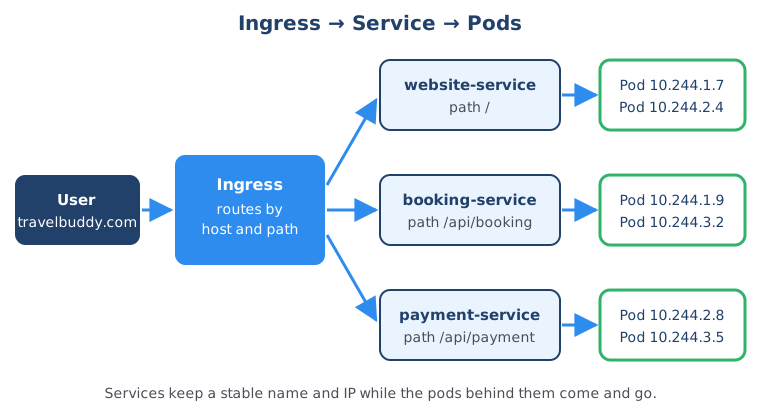
In the IT Fundamentals Course you deploy a complete web app to a cloud server and use IP addresses, ports, DNS and firewalls in practice.
Networking concepts glossary: every term compared
Every concept in one table:
| Concept | What it does | Analogy | In cloud, Docker, Kubernetes |
|---|---|---|---|
| IP address | Identifies a device on a network | House address | Server IPs, container IPs, pod IPs |
| DNS | Translates names into IP addresses | Contacts app on your phone | Docker container names, Service names |
| Port | Identifies one application on a device | Apartment number in a building | docker run -p, Service ports |
| Subnet | Divides a network into sections with their own IP range | Hospital floors and wings | Public and private subnets in a VPC |
| Routing | Moves traffic between networks and subnets | GPS for network data | Route tables |
| Firewall | Allows or blocks traffic by rules | Security guard | Security groups, network ACLs |
| NAT | Lets private devices share one public IP for outgoing traffic | Office receptionist on the main phone line | NAT gateway, Docker port mapping |
| VPC | Your own isolated network in the cloud | Rented office floor | Azure calls it VNet |
| Pod | Smallest unit in Kubernetes, with its own IP | Apartment unit | Kubernetes |
| Service | Stable IP and DNS name in front of changing pods | Department phone number | Kubernetes |
| Ingress | Routes outside HTTP traffic to Services by host and path | Reception desk | Kubernetes Ingress or Gateway API |
The tools changed, from physical routers to route tables and from firewalls to security groups, but the concepts didn’t.
Summary
Every networking setup, from one server to a Kubernetes cluster in the cloud, rests on five foundations: IP addresses with DNS so devices can find each other, ports so traffic reaches the right application, subnets with routing to structure the network, firewalls to control what’s allowed, and NAT so private machines can still reach the internet. Once you understand these, a VPC, a Docker network or a Kubernetes Service is just a new tool for an idea you already know.
To keep going, practice the commands from this guide with Linux commands for beginners, learn how traffic is forwarded and distributed in proxy vs reverse proxy vs load balancer, and go deeper into Kubernetes Services. For the bigger picture, read IT fundamentals for beginners and the software development life cycle, or browse all IT fundamentals guides.
Frequently asked questions
What are the basic concepts of computer networking?
The foundation is five concepts: IP addresses (with DNS to translate names into them), ports, subnets with routing, firewalls, and NAT. IP addresses identify devices, ports identify applications on a device, subnets and routing structure the network, firewalls control which traffic is allowed, and NAT lets private machines reach the internet through one shared public address. Cloud, Docker and Kubernetes networking all build on these same ideas.
What is the difference between a public and a private IP address?
A public IP address is unique on the whole internet, so any device online can send traffic to it. A private IP address, from the ranges 10.0.0.0/8, 172.16.0.0/12 or 192.168.0.0/16, only works inside a local or company network and can be reused by many networks at the same time. Devices with private addresses reach the internet through NAT.
What is the difference between an IP address and a port?
An IP address identifies a device on the network, like the street address of an apartment building. A port number identifies one application on that device, like the apartment number inside the building. A connection always needs both, for example 203.0.113.10:443 means the web server listening on port 443 of the machine with that IP.
What is a subnet in simple terms?
A subnet is a smaller section of a network with its own range of IP addresses, written in CIDR notation such as 10.0.1.0/24. You use subnets to separate things, for example public web servers in one subnet and databases in another, so you can apply different security rules to each. Routers connect subnets so traffic can still flow between them where you allow it.
What does NAT do?
NAT, network address translation, lets many devices with private IP addresses share one public IP address when they talk to the internet. The NAT device replaces the private source address of outgoing requests with its own public address, remembers which internal machine sent each request, and forwards the responses back to it. Your home router does this for every device on your Wi-Fi.
What is the difference between a VPC and a subnet?
A VPC (virtual private cloud) is your own isolated network inside a cloud provider, with one large IP range such as 10.0.0.0/16. Subnets are smaller ranges inside the VPC, such as 10.0.1.0/24, and each one is public or private depending on how its route table sends traffic. You usually have one VPC per environment and several subnets inside it.
Is a security group the same as a firewall?
Yes, a security group is a cloud firewall. In AWS, a security group is attached to individual resources like servers and works like a host firewall, while a network ACL applies to a whole subnet and works like a network firewall. Both use rules that allow traffic by protocol, port and source or destination IP range.


