IT Fundamentals for Beginners: What to Learn First (and in What Order)
Quick answer
IT fundamentals are the basic concepts that every tech job builds on: how computers and operating systems work, the command line and Linux, networking, how the web works with clients, servers and HTTP, programming basics, databases, version control with Git, cloud basics and the software development life cycle. As a beginner, learn them in roughly that order, and learn them by building and deploying one small project instead of memorizing definitions. Once you have these fundamentals, it's much easier to specialize in software development, DevOps, cloud, security or data.
IT fundamentals are the basic concepts that every job in tech builds on: how computers and operating systems work, the command line, networking, how the web works, programming, databases, Git, the cloud and how software projects are organized. It doesn’t matter if you later want to become a software developer, a DevOps engineer, a cloud engineer or a security engineer. You will need these basics in all of them.
When I switched from business and marketing to IT, I had no technical background at all. I didn’t know what a server really was, why I needed the terminal, or how the frontend and the backend of an application talk to each other. I learned all of that the hard way, by jumping between random tutorials, and it took me much longer than it should have. In this article I want to save you that detour: I explain what IT fundamentals actually include, what to learn first and in which order, and how to learn them so they stick.
What are IT fundamentals?
IT fundamentals are the core knowledge about how computers, networks and software work together. It’s not one technology. It’s the big picture that helps you understand what is going on behind any application you use.
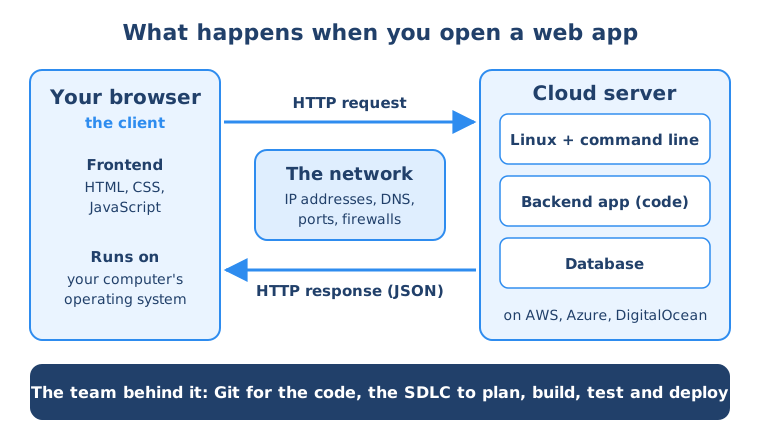
Think about what happens when you open a website. Your laptop runs an operating system. Your browser sends a request over the network to a server somewhere in the cloud. That server runs Linux and a backend application written in some programming language. The application reads data from a database and sends a response back, and your browser shows it to you. And behind it all, a team of people planned, developed, tested and deployed that application, managing their code with Git.
Every bold word in that story is an IT fundamental. Once you understand them, you can follow any technical conversation at work, and every new tool you learn later has a place to fit in.
Why should beginners learn IT fundamentals first?
Many beginners want to jump straight into the “exciting” tools: Kubernetes, AWS, AI, a specific framework. I understand that, but without the fundamentals these tools feel like magic, and magic is very hard to troubleshoot.
Learning the fundamentals first gives you three big advantages:
- Everything else gets easier. Docker makes much more sense when you know what a process, a port and a file system are. The cloud makes sense when you know what a server is.
- No knowledge is wasted. The basics are the same for developers, DevOps, cloud and security engineers, so you can still change direction later without starting from scratch.
- You can use AI tools much better. AI assistants can write code and explain errors, but you need the fundamentals to ask the right questions, judge whether the answer is correct, and fix things when it isn’t.
What are the core areas of IT fundamentals?
Here are the areas I consider the real basics for anyone starting in IT, with what you should understand in each one.
How computers and operating systems work
Start with what happens inside your own computer. Understand the main hardware parts (CPU, memory, storage), what an operating system does (it manages hardware, files, processes and users), and the difference between Windows, macOS and Linux. Learn what a process is, how files and folders are organized, and what file permissions are. This sounds basic, but a lot of later concepts, like containers and servers, are built directly on top of it.
The command line and Linux
Most servers in the world run Linux, and on a server you usually don’t have a graphical interface. You work in a terminal. So learning the command line interface (CLI) is one of the most practical skills you can have. Learn how to navigate the file system, create and edit files, install software with a package manager, manage users and permissions, and connect to a remote server with SSH. My guide on Linux commands for beginners is a good place to start.
Networking basics
Applications constantly talk to each other over networks. You should understand what an IP address is, what ports are, what DNS does when it turns a domain name into an IP address, the difference between a private and a public network, and what a firewall does. You don’t need to become a network engineer, but these concepts come up every single day in IT jobs. I explain them in my guide to networking concepts.
How the web works: client, server and HTTP
This is where everything comes together. A client (like your browser or a mobile app) sends a request to a server, and the server sends back a response. They talk using the HTTP protocol (and HTTPS, its encrypted version), and the data is often sent in a format called JSON. Learn what the frontend and backend of an application are, what a URL consists of, and what an API is. Once you understand this, you understand how almost every modern application works.
Programming basics
You don’t need to become a senior developer, but every IT role benefits from knowing how to program. Learn the core concepts: variables, data types, conditions, loops, functions and how to work with libraries. These concepts are the same in every language. For beginners I usually recommend JavaScript, because you can use it for both the frontend and the backend of web applications, or Python, which is popular for automation, data and AI.
Databases
Almost every application stores data somewhere. Learn what a database is, the difference between SQL (relational) databases like PostgreSQL or MySQL and NoSQL databases like MongoDB, and how an application connects to a database to save and read data.
Version control with Git
In any real project, many people work on the same code. Git tracks every change and lets a team work in parallel without overwriting each other’s work. Learn the basic workflow: clone a repository, commit changes, push and pull, work with branches, and create a merge request (or pull request) so others can review your code. You’ll use Git in nearly every technical IT job.
Cloud basics
Today most applications don’t run on servers in the company’s basement. They run in the cloud, on platforms like AWS, Azure, Google Cloud or DigitalOcean. Learn what the cloud actually is (someone else’s servers that you rent and manage over the internet), what a virtual machine is, and how to create a server on a cloud platform and deploy an application to it.
The software development life cycle
Finally, understand how software projects are organized: how a team plans, designs, develops, tests, releases and operates an application, what roles are involved, and how Agile and Scrum work. This is what turns all the technical pieces into a real workflow. I explain it in detail in Software development life cycle (SDLC).
Get the whole learning path on one page
My free IT Fundamentals Roadmap lays out all of these areas in a clear order, so you know exactly what to learn first and how the pieces connect. You can go through it in under an hour.
In what order should you learn IT fundamentals?
The order matters, because each topic builds on the one before. This is the order I recommend:
| Step | What to learn | Why at this point | You know it when you can… |
|---|---|---|---|
| 1 | How computers and operating systems work | Everything else runs on top of an OS | Explain what an OS does and what a process is |
| 2 | Command line basics | You need it to install tools and work on servers | Navigate folders, create files and install a package in the terminal |
| 3 | How the web works (client, server, HTTP) | Gives you the big picture of every application | Explain what happens when you open a website |
| 4 | Programming basics and a simple frontend | Lets you build something you can see | Build a small web page with HTML, CSS and JavaScript |
| 5 | Backend and databases | Completes the picture of a real application | Build a small backend that saves and reads data |
| 6 | Git | You need it as soon as your project grows | Commit, push, branch and merge your own project |
| 7 | Networking basics | Needed to deploy and connect things | Explain IP addresses, ports, DNS and firewalls |
| 8 | Linux servers and the cloud | Gets your application in front of users | Create a cloud server, SSH into it and deploy your app |
| 9 | SDLC, Agile and Scrum | Shows how a team does all of this together | Explain the phases and roles in a software project |
You don’t have to follow it perfectly. For example, many people learn Git while building their first project, and the SDLC makes sense to look at early and again at the end. The important part is to go step by step and not try to learn everything at once.
How should you learn IT fundamentals?
The biggest mistake I see is learning IT fundamentals as a list of definitions. You read what an IP address is, watch a video about HTTP, do a quiz about databases, and a week later you have forgotten most of it, because none of it is connected to anything you did.
What works much better is learning with one real project. Build a small web application, step by step: plan it, write the frontend, write the backend, connect a database, test it, put the code in Git, create a server in the cloud and deploy it there. Every fundamental shows up naturally on the way, exactly at the moment you need it, and you see how they connect. At the end you have something you can show and explain, which is also great for your first job interviews.
A few more tips that helped me and many of our students:
- Stick to one thing at a time. One language, one project, one cloud platform. You can learn the others later much faster.
- Practice every day, even a little. Thirty focused minutes a day is better than one long weekend session per month.
- Use AI as a tutor, not as a replacement. Ask an AI assistant to explain a concept in a different way, to quiz you, or to explain an error message. But write and understand the code yourself.
- Don’t get stuck on perfection. You don’t need to understand every detail of TCP/IP before you deploy your first app. Get the big picture first, and go deeper when you need it.
Is there an IT fundamentals PDF?
Yes. If you want everything from this article in one document that you can keep, print and check off, my IT Fundamentals Roadmap is a free download. It shows the main areas of IT, how they connect, and the order to learn them in, in a fun, no-stress format. You can get it here.
IT fundamentals course vs CompTIA IT Fundamentals (ITF+) certification
When you search for “IT fundamentals”, you will quickly find the CompTIA IT Fundamentals certification, also known as ITF+ (CompTIA has also been renaming and updating its entry-level certifications over time, so check their website for the current name and version). So which one should you choose: a certification or a practical course?
They are different things with different goals:
| CompTIA IT Fundamentals (ITF+) | Project-based IT fundamentals course | |
|---|---|---|
| What it is | A broad, entry-level certification exam from CompTIA | A practical course where you build and deploy a real project |
| Focus | Breadth: a wide overview of IT concepts and terminology | Depth through practice: how the pieces work together in a real project |
| How you learn | Study the exam objectives, then take an exam | Build, break and fix things hands-on |
| What you get at the end | A certification you can list on your CV | A working application, practical skills and project experience you can show |
| Good for | People who want a formal credential or are aiming for IT support roles | People who want to understand how software is built and deployed, as a base for developer, DevOps or cloud roles |
A certification like ITF+ can be a nice confirmation that you know the basic vocabulary of IT, and some people use it as a first step towards other CompTIA certifications. What it doesn’t give you on its own is the experience of actually doing the work. For roles like software development, DevOps or cloud engineering, employers usually care much more about whether you can build, explain and troubleshoot something.
So I see them as complementary: if you want a certificate, you can take one. But don’t skip the practical part, because that’s where the fundamentals really click.
Frequently asked questions
What are IT fundamentals?
IT fundamentals are the basic concepts every technical role builds on: how computers and operating systems work, the command line and Linux, networking, how the web works with clients, servers and HTTP, programming basics, databases, Git, cloud basics and the software development life cycle.
What should I learn first in IT?
Start with how computers and operating systems work and the basics of the command line. Then learn how the web works with clients, servers and HTTP, followed by programming basics. After that, learn databases, Git, networking and the cloud, ideally by building and deploying one small project.
How long does it take to learn IT fundamentals?
It depends on how much time you can invest and how you learn. With a structured, project-based approach and regular practice, many beginners get a solid foundation in a few months. Learning randomly from unconnected tutorials usually takes much longer.
Do I need a degree to learn IT fundamentals?
No. Everything in this article can be learned online with courses, documentation and hands-on practice. A degree can help, but many people in IT, including me, learned most of their practical skills outside of university.
Is CompTIA IT Fundamentals (ITF+) worth it?
It can be useful if you want a formal entry-level credential, especially if you are aiming for IT support roles or other CompTIA certifications. It focuses on broad concepts, though, so for developer, DevOps or cloud roles, practical project experience is usually more important. Many people combine both.
Is there a free IT fundamentals PDF?
Yes. My IT Fundamentals Roadmap is a free downloadable guide that shows the core areas of IT, how they connect and the order to learn them in. You can get it at the IT Fundamentals Roadmap page on my website.
Where to go from here
Start with the big picture of how software is built in my article on the software development life cycle. If you are deciding which direction to go, read How to get into IT with no experience, where I compare the most popular IT career paths.
For the hands-on basics, continue with Linux commands for beginners, networking concepts explained and proxy vs reverse proxy vs load balancer. All my beginner content is collected on the IT fundamentals topic page.
Learn IT fundamentals by building a real project
The IT Fundamentals Course is a beginner mini-bootcamp of about 3 months. You work through a complete software project, from planning with Scrum and Jira to frontend, backend, database, testing and deploying to a cloud server, and you learn how to use AI tools to learn and work faster.