
Proxy vs reverse proxy vs load balancer: what each one does and how they work together
Quick answer
A forward proxy sits in front of clients (for example a company's laptops) and sends their requests to the internet on their behalf, filtering, caching and logging the traffic. A reverse proxy sits in front of servers and receives requests from the internet on their behalf, adding security, TLS encryption, caching and routing. Load balancing, spreading requests across several servers, is one of the jobs a reverse proxy does, and a cloud load balancer is usually placed in front of the reverse proxy, not used instead of it.
Video chapters (6)
Key takeaways
- A forward proxy acts for the clients: websites see the proxy, not the employee's laptop.
- A reverse proxy acts for the servers: clients see only the proxy, never the backend servers.
- Both kinds of proxy can filter traffic, cache responses and log requests.
- Load balancing is one feature of a reverse proxy, not a separate kind of thing.
- In production you often use both: a cloud load balancer as the public entry point and a reverse proxy like NGINX (or a Kubernetes Ingress controller) for smart routing inside the private network.
- A reverse proxy can route by URL path, headers, cookies or session, for example sending /api to one service and / to another.
- Express or other app frameworks are not a replacement for NGINX; NGINX usually runs in front of them to handle TLS, static files and load balancing.
Proxies, reverse proxies and load balancers are three components that almost every website you use relies on, and they are easy to mix up because they look so similar. In this guide I explain each one with a simple restaurant analogy, compare them side by side, show why companies use a cloud load balancer and a reverse proxy together, and give you a working NGINX configuration you can try. It’s written for beginners: you don’t need any networking background, and I explain every term the first time it comes up.
What is a proxy server?
A proxy server is a computer that sits between you and the server you want to talk to and passes messages back and forth on your behalf. Instead of your laptop talking to a website directly, your laptop talks to the proxy, and the proxy talks to the website.
Here is the analogy I like to use. Imagine you want to have dinner at a popular restaurant, but you don’t want to deal with the staff yourself. Maybe you’re busy, maybe you’re shy, whatever the reason. So your personal assistant makes the reservation for you. The restaurant never talks to you directly; they only talk to your assistant.
In this picture, you are your laptop, the restaurant is a website on the internet, and your personal assistant is the proxy. Two terms you’ll see a lot:
- Client: the device or program that asks for something, like your browser.
- Server: the computer that answers, like the machine that hosts a website.
There are two kinds of proxies, depending on which side they work for: the forward proxy works for the clients, and the reverse proxy works for the servers. When people just say “proxy”, they usually mean a forward proxy.
What is a forward proxy?
A forward proxy sits in front of a group of clients, typically in a company network, and sends their requests out to the internet for them. It acts as a guard between the private network and the public internet: it can block websites, scan responses for malware, log activity and cache content.
Why would a company want that? Say you have hundreds of employees browsing the internet. Your marketing colleague visits a shady website and downloads what looks like a new presentation tool, but the download contains a virus. Once malicious code is on one employee’s laptop inside the company network, it can spread to other machines and do real damage.
To protect the internal network, an administrator configures every company laptop so that all internet traffic goes through the proxy. Now the proxy can:
- Block websites: you keep a blocklist of sites you don’t want people to visit, and the proxy refuses those requests.
- Scan responses: for the requests that are allowed, the proxy checks what comes back for viruses and blocks anything malicious before it reaches the laptop.
- Log activity: it records which sites people visit, which helps with security investigations and compliance.
- Cache responses: caching means keeping a local copy. If one engineer watches a tutorial video, the proxy fetches it once and keeps a copy. When 10 other engineers watch the same video, the proxy hands out the cached copy instead of downloading it again, which saves bandwidth.
- Hide the client: the website sees the proxy’s IP address, not the address of your laptop.
From the client side, using a forward proxy is often just a setting. On Linux and macOS, many command-line tools respect proxy environment variables, and curl can also take a proxy directly. Port 3128 is the default port of Squid, a popular open source forward proxy:
# Send one request through a forward proxy
curl -x http://proxy.example.internal:3128 https://example.com

# Or make most command-line tools in this shell use the proxy
export HTTP_PROXY=http://proxy.example.internal:3128
export HTTPS_PROXY=http://proxy.example.internal:3128
export NO_PROXY=localhost,127.0.0.1,.example.internal
NO_PROXY lists addresses that should be reached directly, like internal company services. In companies, these settings are usually pushed to laptops automatically, so employees never touch them.
What is a reverse proxy?
A reverse proxy sits in front of one or more servers and receives requests from the internet on their behalf. Clients only ever talk to the reverse proxy; the proxy decides which backend server should handle each request and passes the answer back.
Back to the restaurant. Your assistant made the reservation, and now you arrive. Instead of wandering around looking for a table, you check in at the reception desk, and the receptionist says “follow me” and takes you to the right table. The receptionist is also a proxy, but this time on the receiving end. They stand in front of the dining areas (the servers), manage the incoming guests (the requests) and send each guest to a table based on how full each area is.
That last part, spreading guests evenly across tables, is load balancing. It is one of the key features of a reverse proxy, but not the only one. A reverse proxy has most of the same features as a forward proxy, just pointed the other way:
- Shielding the servers: if you run hundreds of servers with access to sensitive data, exposing all of them directly to the internet is dangerous. Instead you keep them in a private network and put one or a few proxies in front as the only entry point. You configure your security measures on that handful of proxies.
- Security checks: the proxy can inspect requests and block attacks or suspicious traffic before it reaches your application.
- TLS encryption: TLS (the successor of SSL, the “S” in HTTPS) encrypts traffic. The reverse proxy holds the certificate and makes sure clients connect over HTTPS.
- Caching: it can keep copies of responses to answer repeat requests faster.
- Logging: it records every request, which is very useful for troubleshooting.
One of the most popular reverse proxies is NGINX (pronounced “engine-x”), and I’ll show you a real NGINX config further down.
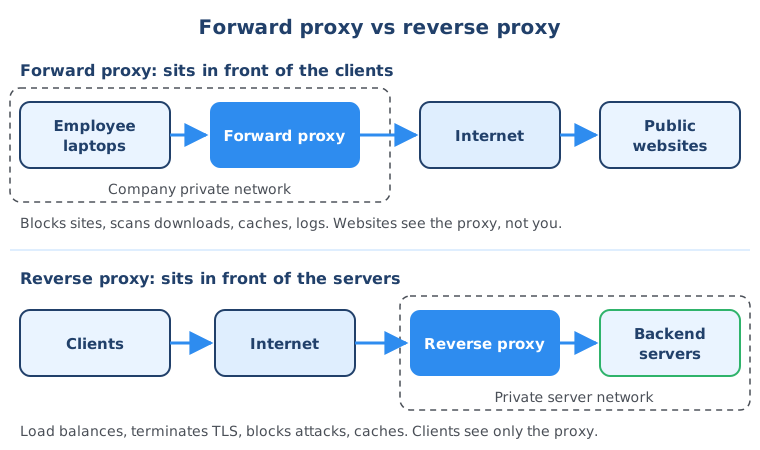
Forward proxy vs reverse proxy vs load balancer
The difference between a forward proxy and a reverse proxy is whose side it is on: a forward proxy represents the clients, a reverse proxy represents the servers. A load balancer is a component whose main job is spreading requests across several servers; for web traffic it is usually a kind of reverse proxy with that one job at its center.
| Forward proxy | Reverse proxy | Load balancer | |
|---|---|---|---|
| Who it serves | Clients (users, employee laptops) | Servers (your application) | Servers (your application) |
| Where it sits | At the edge of the client’s network, between clients and the internet | At the edge of the server network, between the internet and the servers | In front of a group of servers, often as the public entry point |
| Who it hides | The client from the website | The servers from the client | The individual servers from the client |
| Main jobs | Filter and block sites, scan downloads, cache, log | Route requests, TLS termination, security, caching, logging, load balancing | Distribute traffic, health checks, failover when a server dies |
| Who configures it | The company IT team on the client side | The team running the website or app | The team running the website or app |
| Typical tools | Squid, cloud-based secure web gateways | NGINX, HAProxy, Traefik, Envoy, Caddy, Apache httpd | AWS Elastic Load Balancing (ALB, NLB), Google Cloud Load Balancing, Azure Load Balancer, HAProxy, NGINX |
Two details help keep these straight:
- Load balancers come in two flavors. A layer 4 load balancer (like AWS Network Load Balancer) only looks at IP addresses and ports and forwards connections. A layer 7 load balancer (like AWS Application Load Balancer) understands HTTP, so it can also look at URLs and headers. The “layers” refer to the OSI networking model; layer 7 is the application layer where HTTP lives.
- The same tool can play several roles. NGINX and HAProxy are both reverse proxies and load balancers. What matters is the job they do in your setup.
Free download
Proxies make sense now? See what to learn next
Proxies and load balancers sit on top of networking, Linux and web server basics. The roadmap shows you the order to learn these IT fundamentals in, step by step.
Do you need a reverse proxy if you have a cloud load balancer?
In practice you usually use both, because they do different jobs at different layers. The cloud load balancer is the public entry point into your private network, and the reverse proxy behind it does the intelligent routing to the right backend servers inside that network.
This is a question I get a lot. AWS and every other cloud platform offer load balancers, so why run an NGINX reverse proxy at all? Here is how the layered setup looks:
- The cloud load balancer sits outside, as the entry point. It is the only component with a public address.
- Behind it, inside a private network, run your reverse proxies and all the backend servers. Nothing in there is reachable from the internet directly.
- The load balancer does basic distribution across the reverse proxies, and the reverse proxies route each request to the right backend.
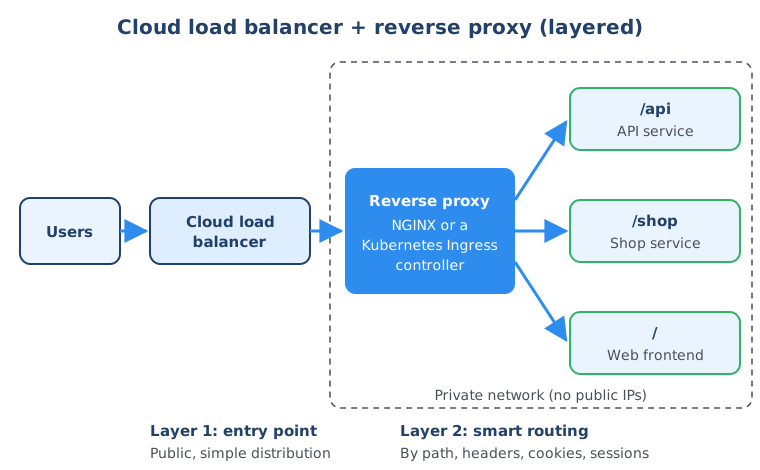
This layered approach makes your infrastructure more secure, because the reverse proxy and the servers are fully enclosed in a private network, and more scalable, because you can add proxies and servers behind the load balancer as traffic grows.
Why load balance twice?
Because the reverse proxy does much more fine-grained, “intelligent” routing. A basic cloud load balancer distributes traffic with simple algorithms, for example “send it to whichever server is least busy”. On a reverse proxy you can write much more detailed routing rules:
- By URL path: in a microservices architecture you might have dozens of small services. Requests to
/apigo to the API service,/shopto the shop service, everything else to the web frontend. - By headers or cookies: for example, send mobile app traffic to a different backend.
- By session (sticky sessions): make sure all requests from the same user always go to the same server, because that server holds their session data.
- After TLS termination: because the proxy decrypts the HTTPS traffic, it can read the request and make these decisions in the first place.
In the restaurant, this is the receptionist who knows the regular guests and takes them to their favorite table, gives a table with the best view to people celebrating a special occasion, and hands vegetarian guests a different menu. It is the same “send guests to a table” job, but with much more information about each guest.
One honest nuance: modern layer 7 cloud load balancers such as AWS Application Load Balancer can do some path-based routing and sticky sessions themselves. The layered design is still common, because a reverse proxy you control gives you more flexible rules, works the same way on any cloud, and keeps all routing logic in one place next to your application.
The same pattern in Kubernetes
This setup is exactly what you get in a Kubernetes cluster with microservices. An Ingress controller is basically a reverse proxy for Kubernetes: it handles the routing to the right service and security inside the cluster. A cloud load balancer sits in front of it as the first line of defense and the single entry point for external traffic. If you want to see how traffic moves from there to your pods, my Kubernetes Services guide covers the next step.
How to configure NGINX as a reverse proxy and load balancer
To make NGINX a reverse proxy, you define your backend servers in an upstream block and send requests to that group with proxy_pass. NGINX then load balances across the servers in the group, by default with round robin (each server gets the next request in turn).
Here is a minimal, working config. It assumes NGINX is installed on a Linux server (for example with sudo apt install nginx on Ubuntu) and that three copies of your app listen on port 3000 on three private IP addresses. Save it as /etc/nginx/conf.d/myapp.conf; the default NGINX setup on Ubuntu and Debian loads every .conf file in that folder.
# /etc/nginx/conf.d/myapp.conf

# The group of backend servers NGINX load balances across
upstream app_servers {
    least_conn;                     # send each request to the server with the fewest active connections
    server 10.0.1.11:3000;
    server 10.0.1.12:3000;
    server 10.0.1.13:3000 max_fails=3 fail_timeout=30s;
}

server {
    listen 80;
    server_name example.com;

    # Serve static files (images, CSS, JavaScript) directly from disk
    location /static/ {
        root /var/www/myapp;        # /static/logo.png -> /var/www/myapp/static/logo.png
    }

    # Everything else goes to the app servers
    location / {
        proxy_pass http://app_servers;
        proxy_set_header Host              $host;
        proxy_set_header X-Real-IP         $remote_addr;
        proxy_set_header X-Forwarded-For   $proxy_add_x_forwarded_for;
        proxy_set_header X-Forwarded-Proto $scheme;
    }
}
What each part does:
upstream app_serversnames a group of servers. Withoutleast_conn, NGINX uses round robin.max_failsandfail_timeouttell NGINX to stop sending traffic to a server for 30 seconds after 3 failed attempts, so one broken server doesn’t break your site.proxy_pass http://app_serversforwards the request to one server from the group.proxy_set_headerlines pass along the original host name, the client’s real IP address and whether the client used HTTP or HTTPS. Without them, your app would think every request comes from NGINX itself.
Test the config and reload NGINX without dropping connections:
sudo nginx -t                     # check the syntax
sudo systemctl reload nginx       # apply the new config
curl -I http://example.com        # send a test request and show the response headers
Route by path to different microservices
To send different URLs to different services, define one upstream per service and add one location per path:
upstream api_service {
    server 10.0.2.21:8080;
    server 10.0.2.22:8080;
}

upstream web_frontend {
    server 10.0.3.31:3000;
}

server {
    listen 80;
    server_name example.com;

    location /api/ {
        proxy_pass http://api_service;   # /api/users is forwarded as /api/users
        proxy_set_header Host $host;
    }

    location / {
        proxy_pass http://web_frontend;
        proxy_set_header Host $host;
    }
}
NGINX picks the location with the longest matching prefix, so /api/users goes to the API service and everything else goes to the frontend.
Sticky sessions
To send the same user to the same server, add ip_hash; inside the upstream block (in place of least_conn). NGINX then picks the server based on the client’s IP address. Cookie-based sticky sessions with the sticky directive are a feature of the commercial NGINX Plus, not open source NGINX.
TLS termination with HTTPS
To serve HTTPS, the reverse proxy needs a certificate. With a free Let’s Encrypt certificate from the certbot tool, the server block looks like this, plus a second block that redirects plain HTTP to HTTPS:
server {
    listen 443 ssl;
    server_name example.com;

    ssl_certificate     /etc/letsencrypt/live/example.com/fullchain.pem;
    ssl_certificate_key /etc/letsencrypt/live/example.com/privkey.pem;

    location / {
        proxy_pass http://app_servers;
        proxy_set_header Host              $host;
        proxy_set_header X-Real-IP         $remote_addr;
        proxy_set_header X-Forwarded-For   $proxy_add_x_forwarded_for;
        proxy_set_header X-Forwarded-Proto $scheme;
    }
}

server {
    listen 80;
    server_name example.com;
    return 301 https://$host$request_uri;
}
This replaces the listen 80 server from the first example. Clients talk HTTPS to NGINX, and NGINX talks plain HTTP to the app servers inside the private network. That is TLS termination.
Do you need NGINX in front of a Node.js or Express app?
For production, yes, usually. Express is a framework for building your application’s logic, while NGINX is built to sit in front of applications, handle many connections, terminate HTTPS, serve static files and load balance. They are not competitors; they are used together.
If you’re a software engineer, you may wonder: when I run my Node.js or Java app, a server starts automatically. Isn’t that already a reverse proxy? Not quite. Node.js doesn’t have a built-in reverse proxy. It has an http module you can use to build a web server (or even a simple proxy), and most people use Express, a minimal web framework on top of it. That server’s job is to run your code, not to protect and distribute traffic for a fleet of servers.
Here is how the two compare:
- NGINX is a high-performance web server and reverse proxy. It is ideal for serving static content, has load balancing built in, handles security features like TLS termination, and handles a very large number of concurrent connections efficiently.
- Express is a minimalist web framework for Node.js, used to build dynamic web applications and APIs. You write custom logic and middleware that decide how each endpoint handles a request. It is less efficient than NGINX at handling huge numbers of connections.
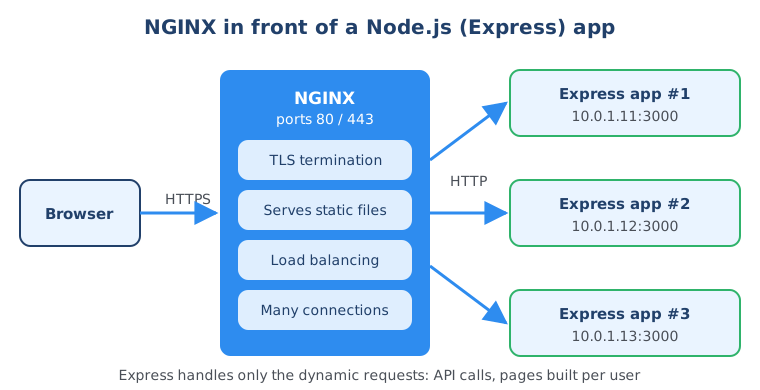
So in a proper production setup, NGINX is deployed in front of the Express application as a reverse proxy. NGINX handles static files, load balances requests across several app instances and manages security, while Express processes the dynamic content. The NGINX config from the previous section is exactly this setup.
One small but important detail when you do this: tell Express it is behind a proxy, so it reads the real client IP and protocol from the X-Forwarded-* headers NGINX sends:
const express = require('express');
const app = express();

// Trust the first proxy in front of the app (NGINX)
app.set('trust proxy', 1);

app.get('/api/hello', (req, res) => {
  res.json({ message: 'Hello', clientIp: req.ip });
});

app.listen(3000, () => console.log('App listening on port 3000'));
Without trust proxy, req.ip would always show NGINX’s address instead of the visitor’s. In the IT Fundamentals Course you build and deploy a complete Node.js web app to a cloud server yourself, so you see where each of these pieces fits in a real project.
Summary
A forward proxy works for the clients: it sits between a private network and the internet and filters, caches and logs outgoing traffic. A reverse proxy works for the servers: it is the single entry point that hides your backend, terminates TLS and routes each request to the right place, and load balancing is one of its features. In production, a cloud load balancer usually sits in front of reverse proxies like NGINX or a Kubernetes Ingress controller, and NGINX usually sits in front of app frameworks like Express. To build the foundations underneath all of this, read my networking concepts guide and Linux commands for beginners, see how real projects move from idea to production in the software development life cycle, and start from the IT fundamentals for beginners overview or the IT fundamentals topic hub.
Frequently asked questions
What is the main difference between a proxy and a reverse proxy?
A forward proxy works on behalf of clients: it sits in front of users' computers and sends their requests out to the internet, so websites see the proxy instead of the user. A reverse proxy works on behalf of servers: it sits in front of the servers and receives requests from the internet, so clients see the proxy instead of the servers. The technology is similar; what differs is whose side the proxy is on.
Is a load balancer a reverse proxy?
Most load balancers that work with HTTP traffic are a type of reverse proxy, because they receive requests on behalf of the servers and forward them. Load balancing, spreading requests across several servers, is one feature of a reverse proxy. A reverse proxy also does other jobs such as TLS termination, caching, security filtering and routing by URL path.
Do I need a reverse proxy if I already use a cloud load balancer like AWS ELB?
Often yes, because the two work at different layers. The cloud load balancer is the public entry point into your private network and spreads traffic across your proxies, while the reverse proxy inside the network does fine-grained routing by path, headers, cookies or sessions to the right backend. In Kubernetes this is exactly the setup of a cloud load balancer in front of an Ingress controller.
Is NGINX a proxy or a reverse proxy?
NGINX is a web server that is most commonly used as a reverse proxy and load balancer. It sits in front of application servers, terminates HTTPS, serves static files, caches responses and distributes requests across multiple backends. It is not typically used as a forward proxy for browsing; tools like Squid are built for that job.
What is an example of a forward proxy?
A typical example is a company proxy that all employee laptops must use to reach the internet. It blocks websites the company does not allow, scans downloads for malware, caches popular content to save bandwidth and logs which sites people visit. Squid is a widely used open source forward proxy.
Why put NGINX in front of a Node.js or Express app?
Express is a framework for building the dynamic part of your application, such as API endpoints and pages built per user. NGINX is built to handle large numbers of concurrent connections efficiently, terminate HTTPS, serve static files and load balance across several app instances. Putting NGINX in front lets each tool do what it is best at.
What is TLS termination on a reverse proxy?
TLS termination means the reverse proxy decrypts the HTTPS traffic from clients, so the certificate lives on the proxy instead of on every backend server. Because the proxy can now read the request, it can make routing decisions based on the URL, headers or cookies. It then forwards the request to the backend, either as plain HTTP inside the private network or re-encrypted.


