
Software Development Life Cycle (SDLC): Phases, Roles and Models Explained for Beginners
Quick answer
The software development life cycle (SDLC) is the process a team follows to turn an idea into working software and keep it running. It has six main phases: plan and gather requirements, design, develop, test, release or deploy, and operate and maintain. Different people own each phase: the product owner plans, developers build, testers check quality, and DevOps or operations engineers release and run the application. SDLC models like Waterfall and Agile describe how a team moves through those phases, either once in sequence or in many short cycles.
The software development life cycle (SDLC) is the structured process a team follows to turn an idea into working software and keep it running. It is usually described in six phases: plan and gather requirements, design, develop, test, release, and operate and maintain. Every software project goes through these phases, whether it’s a small mobile app or a banking system, and every phase has people who are responsible for it.
When I started my first job as a software developer, nobody explained this to me. I knew how to write some code, but I didn’t understand why there were product owners, testers and operations people, what a sprint was, or why my code had to go through so many steps before users could see it. Understanding the SDLC is what connects all of these pieces. So in this article I explain each SDLC phase, who does what in a software project, the most common SDLC models like Waterfall and Agile, and how DevOps fits into all of it.
What is the software development life cycle (SDLC)?
The SDLC is the life of a piece of software, from the first idea to the day it runs in front of users, and every change after that. It answers three questions for a team: what do we build, how do we build it, and how do we get it to users safely.
It is called a “life cycle” because it never really ends. Once an application is live, users give feedback, bugs show up, and the business wants new features. Each of those starts the cycle again: plan the change, design it, develop it, test it, release it and operate it.
You don’t need to be a developer to benefit from understanding the SDLC. Testers, project managers, DevOps engineers, cloud engineers and security engineers all work inside this cycle. That’s why I think it’s one of the most important IT fundamentals for anyone who wants to work in tech.
What are the phases of the SDLC?
There are different ways to split the SDLC, and you will see versions with five, six or seven stages. The names change a little, but the work is the same. I use these six phases:
| Phase | What happens | Main question | Who is responsible |
|---|---|---|---|
| 1. Plan and requirements | Define the goal, the users and what the software must do | What do we build and why? | Product owner, business stakeholders, whole team |
| 2. Design | Decide how the software will be structured: architecture, screens, data, technologies | How will we build it? | Software architects, senior developers, UX/UI designers |
| 3. Develop | Write the code for frontend, backend and database | Build it | Software developers (frontend, backend, full stack) |
| 4. Test | Check that the software works and does what was required | Does it work correctly? | Testers / QA engineers, developers (automated tests) |
| 5. Release / deploy | Package the application and put it on servers where users can reach it | How do users get it? | DevOps engineers, system administrators, cloud engineers |
| 6. Operate and maintain | Keep it running, monitor it, fix bugs, handle security updates | Is it healthy and secure? | Operations, DevOps, SRE, plus developers for fixes |
And then the cycle starts again with the next feature or improvement.
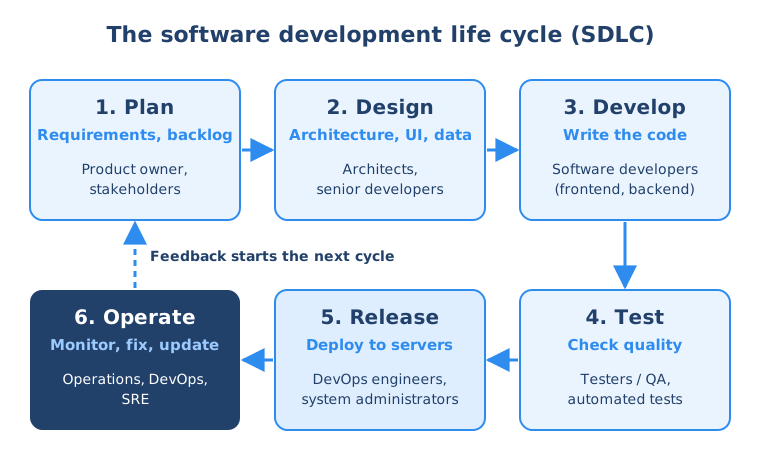
Let me go through each phase with a simple example: imagine a team building a web app where employees of a company can create a profile and find colleagues.
1. Plan and gather requirements
Everything starts with a problem or an idea. In the planning phase the team figures out what the software should do, for whom, and why it is worth building. For our example app, the requirements could be: employees can sign up, add their name, role and photo, and search for colleagues by team.
The person who owns this phase is usually the product owner (or product manager). They talk to users and business stakeholders, collect the requirements, and turn them into a list of work items, often called user stories, like “As an employee, I want to search colleagues by team so I can find the right contact person”. In Agile teams this list is called the product backlog, and it usually lives in a tool like Jira.
Good planning saves a lot of time later. Building the wrong thing perfectly is still building the wrong thing.
2. Design
In the design phase the team decides how to build what was planned. This includes:
- The architecture: which parts the application has, for example a frontend in the browser, a backend server and a database
- The technologies: for example JavaScript with Vue.js for the frontend, Node.js for the backend and MongoDB for the database
- The user interface: how the screens look and how users move through them
- The data model: what data is stored and how it is structured
Software architects, senior developers and UX/UI designers usually lead this phase. In smaller teams, the developers do the design themselves.
3. Develop
This is the phase most people think of when they think of software: developers write the code. Frontend developers build what users see in the browser or on their phone. Backend developers build the logic that runs on the server, connects to the database and saves and processes data. Full stack developers do both.
Developers don’t work alone on one big file. They work in a team on the same codebase, so they use version control with Git to track every change, work on separate branches and merge their changes together. They also use package managers to install libraries instead of writing everything from scratch.
4. Test
Before users see the software, the team has to make sure it works and doesn’t break anything that already worked. In the testing phase, testers or QA (quality assurance) engineers check the application against the requirements, find bugs and send them back to the developers.
Today a big part of testing is automated. Developers write unit tests that check small pieces of code, and integration tests that check that the pieces work together. These tests run automatically with every change, which is much faster and more reliable than clicking through the application by hand every time. Manual and exploratory testing is still valuable for things automation doesn’t catch well, like usability.
5. Release and deploy
Working code on a developer’s laptop is not useful to anyone. In the release phase the application is packaged and deployed to servers where users can reach it. That means preparing a server (today usually a virtual server on a cloud platform like AWS, Azure or DigitalOcean), configuring the operating system, which is usually Linux, opening the right ports in the firewall, and running the application there.
Most teams deploy to several environments before production. For example a development environment, then a test or staging environment that looks like production, and only then the production environment that real users use.
This phase used to belong to system administrators or a separate operations team. Today it is very often done by DevOps engineers, who automate it with CI/CD pipelines so that a tested change can go to production in minutes instead of weeks.
6. Operate and maintain
Once the application is live, the work is not done. Somebody has to keep it running, secure and fast. In this phase the team monitors the application and servers, reacts to errors and outages, applies security updates, scales the infrastructure when more users come, and fixes bugs that users report.
Operations engineers, DevOps engineers and site reliability engineers (SREs) usually own this phase, together with developers who fix the bugs. Everything the team learns here, like which features users actually use and what breaks, flows back into planning. And that’s how the cycle closes.
See how the SDLC fits into the bigger IT picture
The SDLC is one of the core IT fundamentals, together with operating systems, networking, programming and the cloud. My free IT Fundamentals Roadmap shows you all of them and the order to learn them in.
What are the roles in a software project?
A software project is a team effort, and the SDLC is a good way to understand who does what. Here are the most common roles you will meet:
| Role | What they do | Main SDLC phases |
|---|---|---|
| Product owner / product manager | Decides what to build, prioritizes the backlog, represents users and business | Plan |
| Scrum master / project manager | Organizes the process, removes blockers, keeps the team working smoothly | All phases |
| UX/UI designer | Designs how the application looks and how users interact with it | Design |
| Software architect | Designs the overall structure and technology choices | Design |
| Software developer | Writes the code for frontend, backend or both | Develop, test, maintain |
| Tester / QA engineer | Checks quality, finds bugs, writes and runs tests | Test |
| DevOps engineer | Automates build, test and deployment; manages infrastructure | Release, operate |
| System administrator / cloud engineer | Sets up and maintains servers and cloud infrastructure | Release, operate |
| Security engineer | Makes sure the application and infrastructure are secure | All phases |
In a small startup, one person might cover three or four of these roles. In a large company, each role can be a whole team. But the tasks themselves exist in every project, and if you understand them, you will understand what’s going on in your first job from day one, whatever your role is.
What are the SDLC models?
The phases tell you what needs to happen. An SDLC model tells you how the team moves through those phases. These are the models you will hear about most:
- Waterfall: the phases happen one after another, once. You finish all requirements, then all design, then all development, then all testing, then you release. Each phase “flows down” into the next, like a waterfall.
- V-model: a stricter version of Waterfall where every development phase has a matching testing phase planned from the start.
- Iterative and incremental: the software is built in pieces, and each piece goes through the phases, so the product grows step by step.
- Spiral: an iterative model that puts a strong focus on analyzing risks in each round. It is mostly used in large, high-risk projects.
- Agile: the team works in short cycles, delivers small working pieces of software often, and adapts the plan based on feedback. Scrum and Kanban are the most popular ways to work in an Agile way.
Today most software teams work with some form of Agile, but Waterfall is still used where requirements are fixed and changes are expensive, for example in some government, hardware or strictly regulated projects.
Waterfall vs Agile: what’s the difference?
This is the comparison you’ll see most often, so let’s put them side by side:
| Waterfall | Agile | |
|---|---|---|
| How it moves through the phases | Once, in strict order | In many short cycles (iterations) |
| Requirements | Defined completely at the start | Start with a backlog that changes over time |
| When users see working software | At the end of the project | After every iteration, often every few weeks |
| Handling changes | Difficult and expensive once a phase is done | Expected and welcome |
| Testing | A separate phase after development | Part of every iteration |
| Customer involvement | Mostly at the start and at the end | Continuous feedback |
| Good fit for | Fixed, well-understood requirements | Products that evolve with user feedback |
| Main risk | Building the wrong thing and finding out late | Losing the big picture without good planning |
The main problem with Waterfall in software is that you only find out at the very end whether you built the right thing. If the requirements were wrong, or the market changed in the meantime, a lot of work is wasted. Agile was created exactly to solve that: build a small piece, show it to users, learn, and adjust.
How do Agile and Scrum fit into the SDLC?
Agile doesn’t replace the SDLC phases. In Agile, the team goes through all the phases in every short cycle, just for a small piece of the product instead of the whole thing.
Scrum is the most widely used Agile framework, so it’s worth knowing its basic vocabulary:
- Product backlog: the prioritized list of everything the product might need, owned by the product owner
- Sprint: a fixed time box, usually one to four weeks, in which the team plans, builds, tests and ideally delivers a working increment
- Sprint planning: at the start of a sprint, the team picks the backlog items it will work on
- Daily stand-up (daily scrum): a short daily meeting where the team syncs on progress and blockers
- Sprint review: the team shows what it built to stakeholders and collects feedback
- Retrospective: the team reflects on how it worked and what to improve in the next sprint
The work is usually visible on a Scrum board in a tool like Jira, with columns like “To do”, “In progress”, “In review” and “Done”. When you start your first IT job, there’s a very good chance you will spend time in sprint planning and stand-ups and move tickets across a board like that, no matter if you are a developer, tester or DevOps engineer.
How does DevOps connect to the SDLC?
Agile made development faster: teams could produce new features every few weeks. But in many companies the release and operations phases stayed slow and manual. Developers “threw the code over the wall” to a separate operations team, deployments took weeks and often broke things, and the two teams blamed each other.
DevOps is about removing that wall and automating the release and operate phases of the SDLC, so that the whole cycle, from a code change to a running feature in production, is fast, reliable and repeatable. In practice that means:
- Continuous integration (CI): every code change is automatically built and tested
- Continuous delivery and deployment (CD): tested changes are automatically deployed to environments, all the way to production
- Infrastructure as code: servers and cloud infrastructure are created from code instead of by hand
- Monitoring and feedback: the team sees what happens in production and feeds that back into planning
That’s why DevOps is often drawn as an infinity loop: plan, code, build, test, release, deploy, operate, monitor, and back to plan. It’s the SDLC, done continuously and automated. If you want to go deeper here, I explain the concept in detail in What is DevOps.
This is also why I always say that DevOps is not an entry-level field. To automate the software development life cycle, you first need to understand the life cycle itself.
Frequently asked questions
What is the SDLC in simple terms?
The SDLC (software development life cycle) is the process a team follows to build software and keep it running. The team plans what to build, designs how to build it, writes the code, tests it, releases it to users and then operates and improves it. After that, the cycle starts again with the next change.
What are the 6 phases of the SDLC?
The six common SDLC phases are: plan and gather requirements, design, develop, test, release or deploy, and operate and maintain. Some sources combine or split phases, so you will also see five or seven stages, but the work they describe is the same.
What is the difference between SDLC and Agile?
The SDLC describes the phases every software project goes through. Agile is one way, or model, of moving through those phases: in short, repeated cycles that each deliver a small working piece of software. So Agile is not an alternative to the SDLC, it is an SDLC model, like Waterfall.
Who is responsible for each phase of the SDLC?
Usually the product owner leads planning, architects and senior developers lead design, software developers write the code, testers and QA engineers check quality, and DevOps engineers, system administrators or cloud engineers release and operate the application. In small teams one person may cover several of these roles.
Is Waterfall still used?
Yes. Most software teams work in an Agile way today, but Waterfall is still used in projects with fixed, well-understood requirements where changes are expensive, for example in some regulated industries or projects tied to hardware. Many companies also use a mix of both.
Do I need to know the SDLC to get an IT job?
You don’t need to memorize it, but understanding it helps a lot in any IT role. It explains why your team has stand-ups and sprints, why your code needs tests, and what happens after you push a change. People who understand the whole life cycle usually get productive in a new job much faster.
Where to go from here
The SDLC is one of the core topics in IT fundamentals for beginners, where I show you everything else to learn first and in what order. If you are still deciding which role in the life cycle you want to have, read How to get into IT with no experience, and if the release and operate phases sound exciting, continue with What is DevOps.
To understand what happens technically in the release and operate phases, my guides on networking concepts, Linux commands for beginners and proxy vs reverse proxy vs load balancer are a great next step. You can find all beginner articles on the IT fundamentals topic page.
Go through the complete SDLC yourself
In the IT Fundamentals Course you work through a complete software project and take on every role: you plan it with Scrum and Jira, build the frontend and backend, connect a database, write tests and deploy the app to a cloud server. It's the best way to really understand how software is built.